




Skip to content
View in the app

A better way to browse. Learn more.

Pokemon Revolution Online

A full-screen app on your home screen with push notifications, badges and more.

To install this app on iOS and iPadOS
  1. Tap the Share icon in Safari
  2. Scroll the menu and tap Add to Home Screen.
  3. Tap Add in the top-right corner.
To install this app on Android
  1. Tap the 3-dot menu (⋮) in the top-right corner of the browser.
  2. Tap Add to Home screen or Install app.
  3. Confirm by tapping Install.

Lillipup

Registered User
  • Joined

  • Last visited

Everything posted by Lillipup

  1. That's so sad. I hope you meet your best friend Strangle again someday!
  2. Thanks! Almost time for me to go work hah
  3. I notice whenever I go up the waterfall in Mt. Silver 1F as soon as I find a wild spawn, it puts me back into the waterfall area and I get stuck in it. Happened to me 3 times already and then it sends me all the way back to Viridian City Pokemon Center.
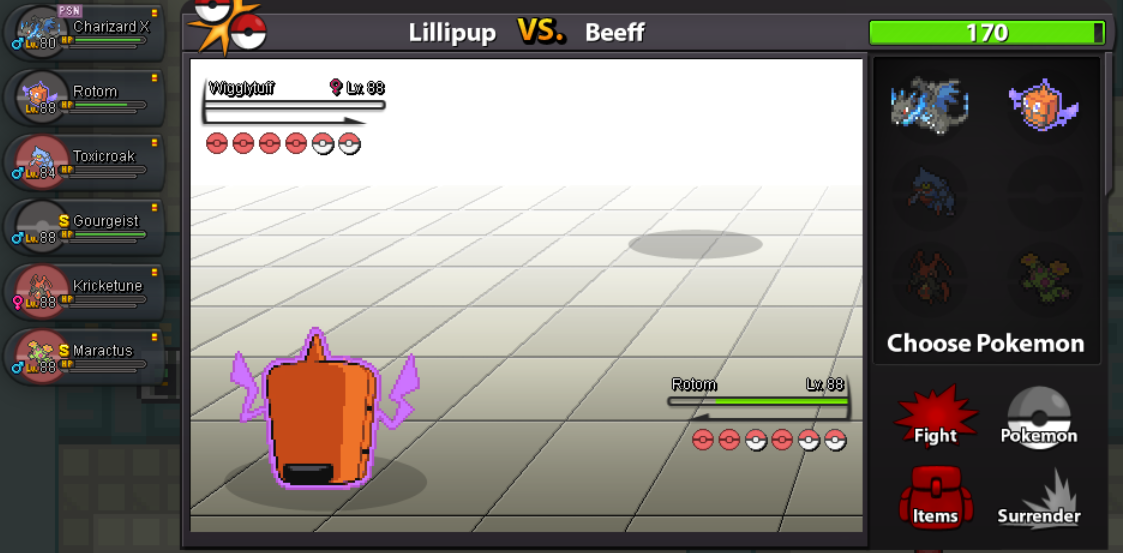
  4. Lillipup posted a topic in Resolved Bugs
    Gourgeist is missing sprite image within Random Battles.
  5. Sent you a message o/

Account

Navigation

Search

Search

Configure browser push notifications

Chrome (Android)
  1. Tap the lock icon next to the address bar.
  2. Tap Permissions → Notifications.
  3. Adjust your preference.
Chrome (Desktop)
  1. Click the padlock icon in the address bar.
  2. Select Site settings.
  3. Find Notifications and adjust your preference.