




New Trade Zone
Trade Zone is now live
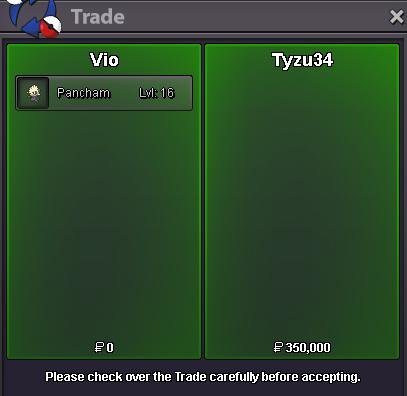
Use the new Trade Zone for auctions and instant-price trades so Pokemon and item offers are easy to find.

Vio
Registered User
-
Joined
-
Last visited
-
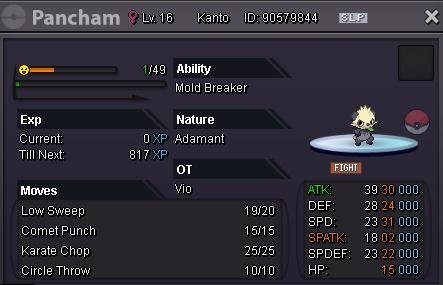
WTS THIS PANCHAM LIKE THE PICTURE S.O 100K NO INSTA MIN BID 50K FRESH CASH ONLY CONTACT ME VIA HERE / DISCORD : VIO#6000 / INGAME : VIO AUCTION END AT 10PM SUNDAY, JUNE 28 (GMT+7)
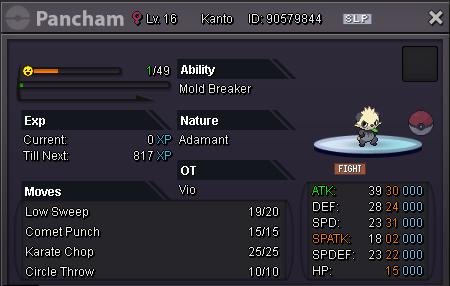 WTS THIS PANCHAM LIKE THE PICTURE S.O 500K NO INSTA MIN BID 100K FRESH CASH ONLY CONTACT ME VIA HERE / DISCORD : VIO#6000 / INGAME : VIO AUCTION END AT 10PM SUNDAY, MAY 31 (GMT+7)
 Vio - GoldVio - SilverVio - Silver22852258Vio - SilverVio - SilverVio - SilverVio - Silver




Account
Navigation
Search
Configure browser push notifications
Chrome (Android)
- Tap the lock icon next to the address bar.
- Tap Permissions → Notifications.
- Adjust your preference.
Chrome (Desktop)
- Click the padlock icon in the address bar.
- Select Site settings.
- Find Notifications and adjust your preference.
Safari (iOS 16.4+)
- Ensure the site is installed via Add to Home Screen.
- Open Settings App → Notifications.
- Find your app name and adjust your preference.
Safari (macOS)
- Go to Safari → Preferences.
- Click the Websites tab.
- Select Notifications in the sidebar.
- Find this website and adjust your preference.
Edge (Android)
- Tap the lock icon next to the address bar.
- Tap Permissions.
- Find Notifications and adjust your preference.
Edge (Desktop)
- Click the padlock icon in the address bar.
- Click Permissions for this site.
- Find Notifications and adjust your preference.
Firefox (Android)
- Go to Settings → Site permissions.
- Tap Notifications.
- Find this site in the list and adjust your preference.
Firefox (Desktop)
- Open Firefox Settings.
- Search for Notifications.
- Find this site in the list and adjust your preference.