




New Trade Zone
Trade Zone is now live
Use the new Trade Zone for auctions and instant-price trades so Pokemon and item offers are easy to find.

Lucid
Registered User
-
Joined
-
Last visited
-
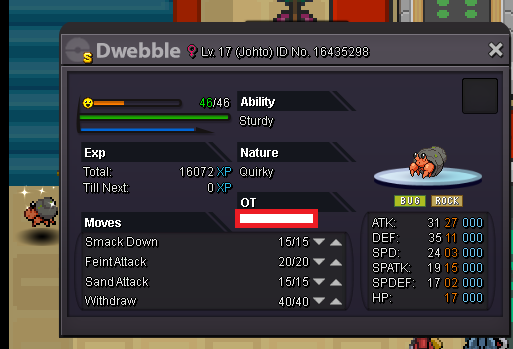
Wanting to sell this shiny Dwebble from Johto bcc. From my understanding its a tier 10 based on the prowiki rarity tier list. meaning its unfarmable (only headbutable trees, bug contest exclusive, etc....) I see pokemon of similar rarity going for 6m or more on here but I also understand that its not the most amazing Dwebble therefore, current asking price is 3.5m Not looking to auction comment on here or msg me in game: Lucid first come, first serve
-
i think it would just be nice to have some simple hotkeys like: b: backpack m: Map s:shop o:social t: trainer of course these dont have to be the specific mappings and maybe a feature to switch what they could be binned to would go great with this. I think its a simple thing that could add just a little more convenience and fluidity to the game.
-
Noted and appreciated. Happy hunting.
-
Hey Knuckles, After reviewing what you've said about the Rare Hunters I am very interested. I have strong dedication to training and catching the best pokes as well as helping others to the best of my ability. If at all possible I'd greatly enjoy being among your company and the company of other hunters alike.