




Skip to content
View in the app

A better way to browse. Learn more.

Pokemon Revolution Online

A full-screen app on your home screen with push notifications, badges and more.

To install this app on iOS and iPadOS
  1. Tap the Share icon in Safari
  2. Scroll the menu and tap Add to Home Screen.
  3. Tap Add in the top-right corner.
To install this app on Android
  1. Tap the 3-dot menu (⋮) in the top-right corner of the browser.
  2. Tap Add to Home screen or Install app.
  3. Confirm by tapping Install.
New Trade Zone
Trade Zone is now live
Use the new Trade Zone for auctions and instant-price trades so Pokemon and item offers are easy to find.
Open Trade Zone

Iwflylol

Registered User
  • Joined

  • Last visited

  1. Hey Magikarp! I'm Torchic and I heard you're looking for a new friend because Chappy is very busy at the moment. I'd like to meet you so I can visit you at Kalijodo Lake to cool down a bit in the fresh water or you jump over to Mt. Summer and we get a tan, it's up to you. I know fire and water is not the perfect match but true to the old adage that opposites attract I think we can be good friends and make this vacation unforgettable.
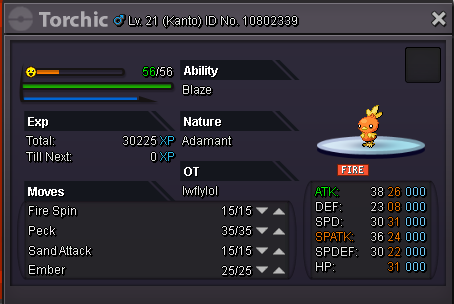
  2. 1. What's your Player name? Iwflylol 2. Number of hours played? 526 Hr 3. What's your favorite Pokemon? Absol, Pachirisu, Milotic 4. How old are you? 19 5. When's your Birthday? (Optional) 5. June 1998

Account

Navigation

Search

Search

Configure browser push notifications

Chrome (Android)
  1. Tap the lock icon next to the address bar.
  2. Tap Permissions → Notifications.
  3. Adjust your preference.
Chrome (Desktop)
  1. Click the padlock icon in the address bar.
  2. Select Site settings.
  3. Find Notifications and adjust your preference.