




New Trade Zone
Trade Zone is now live
Use the new Trade Zone for auctions and instant-price trades so Pokemon and item offers are easy to find.

Saranghaeyo
Suspended
-
Joined
-
Last visited
Everything posted by Saranghaeyo
-
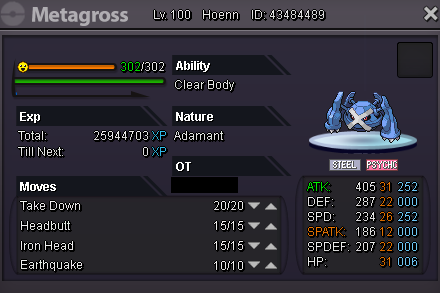
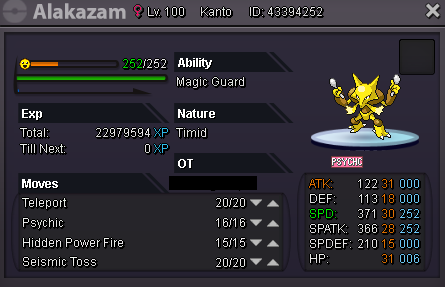
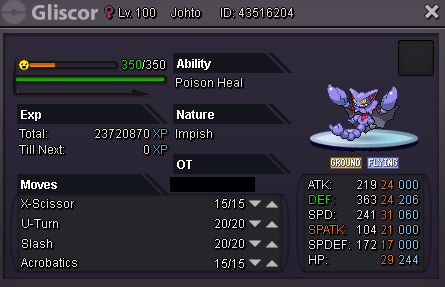
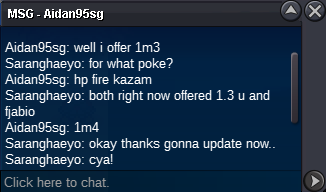
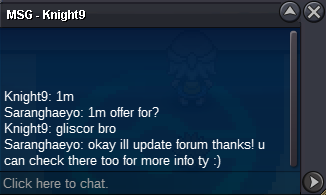
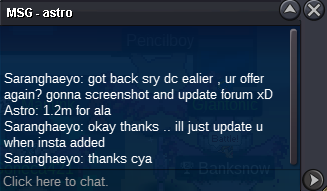
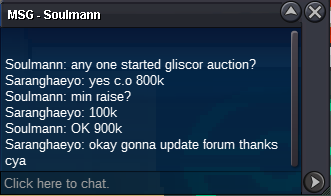
done updated in gliscor right?. Can pls specify next time what poke so others wont be confused thanks!Hello everyone! Nice to play with you all :) I will start an auction on 4 pokemons :3 full trained pokes :) All auctions end 48 hrs or (2 days) after their first offer. (Insta will be added soon) ---- For any other concerns, mistakes or questions: Pls message me here or ingame :) Ingame: Saranghaeyo Discord: Saranghaeyo#3472 ~~~~~~~~~~~~~~~~~~~~~~~~~~~~~~~~~~~~~~~~~~~~~~~~~~ #1. Metagross (Epic 31x2 22+): S.O 2m / Min. raise: 300k / Insta: 6m (SOLD) SOLD: 5m to Dayne Auction started: 03/09/20 - 3:45am (gmt+8) Auction ends: 03/11/20 - 3:45am (gmt+8) (SOLD END) -- #2. Alakazam (hp fire 30/28): S.O 1m / Min. raise: 100k / Insta: 4m) (SOLD INSTA) SOLD: Insta by Alderego7 Auction started: 03/09/20 - 3:20am (gmt+8) Auction ends: 03/11/20 - 3:20am (INSTA END) SOLD -- #3. Gliscor (Impish H.A,31 spd, semi epic): S.O 800k / Min. raise: 100k / Insta: 3m (SOLD) SOLD: 1.5m to Araragikun Auction started: 03/09/20 - 3:20am (gmt+8) Auction ends: 03/11/20 - 3:20am (gmt+8) +15mins (END) -- #4. Venusaur (hp Ice,31 spatk): S.O 500k / Min. raise: 100k / Insta: 1.8m (SOLD) SOLD: 1m to Slin1993 Auction started: 03/10/20 - 2:32am (gmt+8) Auction ends: 03/12/20 - 2:32am (gmt+8) (END) Have a blessed day Everyone! ------------------------------------------- (updated 03/12/20 - 02:40am (gmt+8) 1 more left venusaur still ongoing :) THANKS A LOT EVERYONE!!

Account
Navigation
Search
Configure browser push notifications
Chrome (Android)
- Tap the lock icon next to the address bar.
- Tap Permissions → Notifications.
- Adjust your preference.
Chrome (Desktop)
- Click the padlock icon in the address bar.
- Select Site settings.
- Find Notifications and adjust your preference.
Safari (iOS 16.4+)
- Ensure the site is installed via Add to Home Screen.
- Open Settings App → Notifications.
- Find your app name and adjust your preference.
Safari (macOS)
- Go to Safari → Preferences.
- Click the Websites tab.
- Select Notifications in the sidebar.
- Find this website and adjust your preference.
Edge (Android)
- Tap the lock icon next to the address bar.
- Tap Permissions.
- Find Notifications and adjust your preference.
Edge (Desktop)
- Click the padlock icon in the address bar.
- Click Permissions for this site.
- Find Notifications and adjust your preference.
Firefox (Android)
- Go to Settings → Site permissions.
- Tap Notifications.
- Find this site in the list and adjust your preference.
Firefox (Desktop)
- Open Firefox Settings.
- Search for Notifications.
- Find this site in the list and adjust your preference.