




New Trade Zone
Trade Zone is now live
Use the new Trade Zone for auctions and instant-price trades so Pokemon and item offers are easy to find.

Dadmaster420
Registered User
-
Joined
-
Last visited
Everything posted by Dadmaster420
-
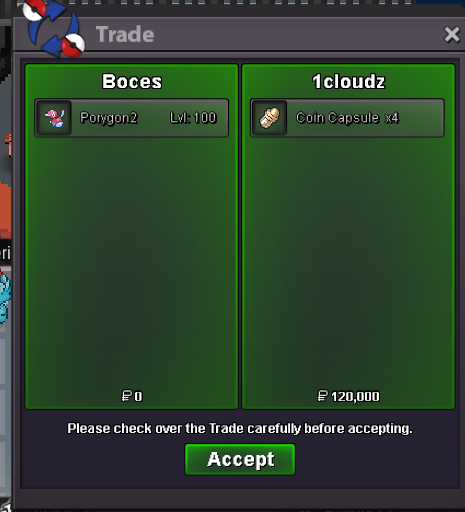
auction has already ended and 1cloudz won@Suncity i think you would have to bid 1m90k to bid over the 2 ccstart 800k min bid 50k 2 day auction from start cc=520k rr=600k bms= 260k
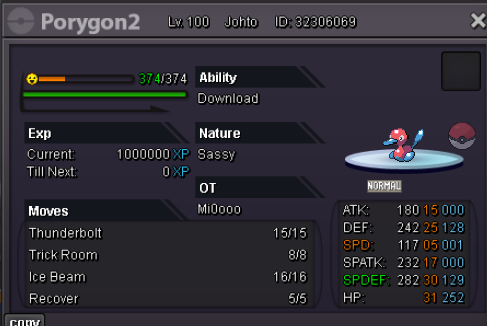 Start 1m 50k min bid 1 day auction from start no insta cc=520k
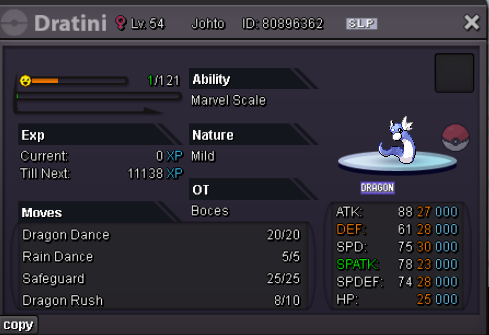 let me know when you're ready to pick it up or pm me in game on Boces @Phucs1.5m start, 100k min bid, 2 day auction insta 7m
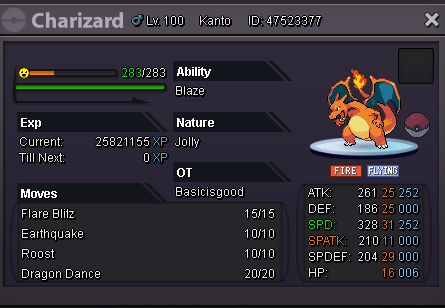
 add end date pls and ill startstart@NayeonBlueI work for another 3 hours when I get off I can make the tradeC.o 2.2m about 18 hours left on auctionbumprr=700k cc=370k start is 2m,min offer is 200k, insta 6m 3 day auction
 What's your IGN? dadmaster420 Please post a picture of your trainer card! What is your discord ID? dadmaster420#8454 How far are you in story? i just finished johto and will finish others soon :) How active are you in PRO? (How often do you play?) every day poke flow Are you a PvP or PvE player? Or do you enjoy both? both are nice Have you ever been banned in game and why? never, because i dont do bad stuff Why do you want to join Calamity guild? chill with friends make new friends and help where i can, enjoy a easy going guild with people that want to have fun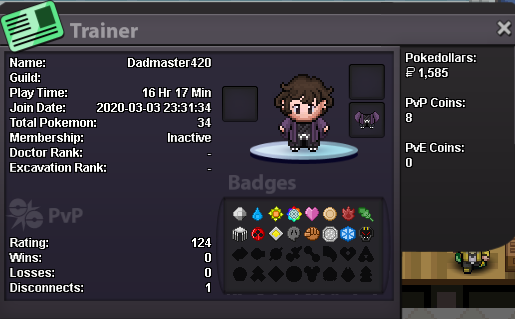



Account
Navigation
Search
Configure browser push notifications
Chrome (Android)
- Tap the lock icon next to the address bar.
- Tap Permissions → Notifications.
- Adjust your preference.
Chrome (Desktop)
- Click the padlock icon in the address bar.
- Select Site settings.
- Find Notifications and adjust your preference.
Safari (iOS 16.4+)
- Ensure the site is installed via Add to Home Screen.
- Open Settings App → Notifications.
- Find your app name and adjust your preference.
Safari (macOS)
- Go to Safari → Preferences.
- Click the Websites tab.
- Select Notifications in the sidebar.
- Find this website and adjust your preference.
Edge (Android)
- Tap the lock icon next to the address bar.
- Tap Permissions.
- Find Notifications and adjust your preference.
Edge (Desktop)
- Click the padlock icon in the address bar.
- Click Permissions for this site.
- Find Notifications and adjust your preference.
Firefox (Android)
- Go to Settings → Site permissions.
- Tap Notifications.
- Find this site in the list and adjust your preference.
Firefox (Desktop)
- Open Firefox Settings.
- Search for Notifications.
- Find this site in the list and adjust your preference.