




New Trade Zone
Trade Zone is now live
Use the new Trade Zone for auctions and instant-price trades so Pokemon and item offers are easy to find.

Xanthinarose
Registered User
-
Joined
-
Last visited
-
Shop back open, lending trade has returned :)
-
Yes the service shop is still very much active, contact me through discord if you'd like to rent a mon and I will get back to you ASAP 🙂 (Faster replies on Friday-Sunday)
-
Okies, messaged via discord.
-
Gliscor sold
-
Impish H.A gliscor added.
-
Contact information is in the original post in yellow 🙂
-
up :3
-
+1
-
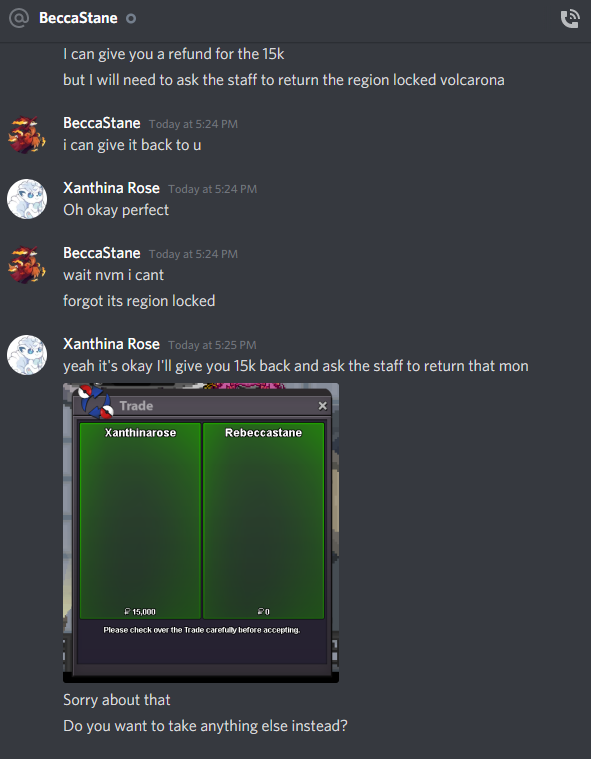
Yes I have the volcarona back now and I have already issued a refund and we came to a private conclusion regarding the rental. Thank you for your help !
-
I have the discord conversation about giving the wrong volcarona as well if needed

-
Yes I have the screenshot here:
-
Hello there, I accidentally traded my volcarona as a rental trade but it is region locked for the person receiving it named "Rebeccastane" and I need it back but they can't trade it. Hoping you can help return the pokemon ❤️ Screenshot of the pokemon is here:

-
Open and updated!
-
Rental shop back open for business, contact me through discord if you need a rental :3
-
Looking to sell this gliscor for 1.4 mil My Discord is: Xanthina Rose#5802
