New Trade Zone
Trade Zone is now live
Use the new Trade Zone for auctions and instant-price trades so Pokemon and item offers are easy to find.

Dragokraz
Suspended
-
Joined
-
Last visited
Everything posted by Dragokraz
-
Start offer 1m8 for porygon2, after start there is 3 days auction, so i don't accept any low offer under 1m8.
-
EDIT : Look first post for to see all pokemon available.
-
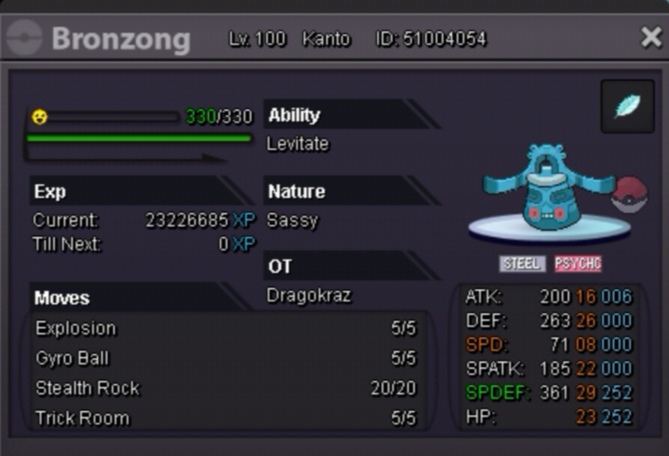
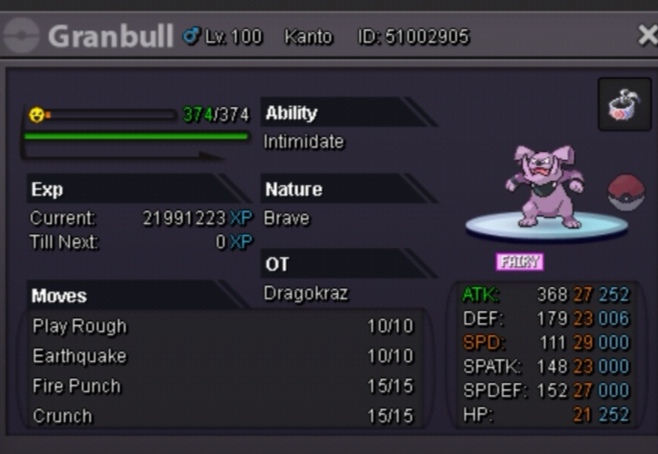
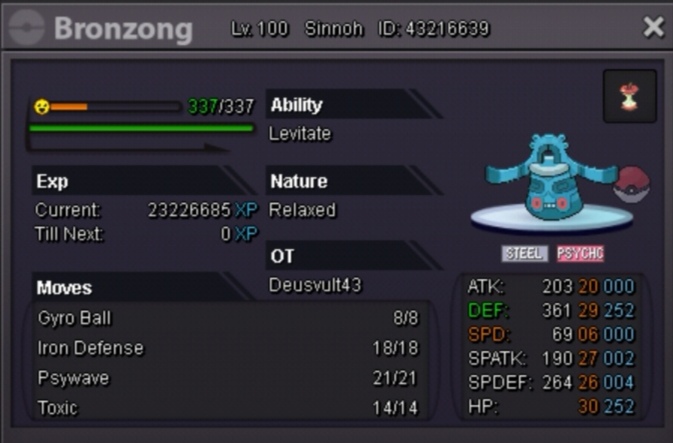
Sassy Bronzong start : 700k Min bid 100k Auction end in 3 days after first bid. Relaxed Bronzong : 800k Min bid 100k Auction end in 3 days after first bid. Granbull : 600k Mind bid 100k Auction end in 3 days after first bid. Item is not include in the price and there are not for sell. Moveset is ready for a trick room team or if you don't play trick room you can just use Bronzong for set up Reflect and Light Screen / Stealth Rock and Explosion. Feel free to bid in game or here. Good luck.
-
-
Thank you Hawluchaa and i am sorry because i didn't know this rule, we can add insta at the end but not change the insta, i confused this 2 rules. Have a nice day too, Auction is done, Gliscor is sold for 650k to Dawnbr3aker Thank you all, Dragokraz
-
2 days left before the end of the auction.
-
Thank you for your bid, the auction will continue 3 days after the first bid. So the auction end the 8th October at 07:00 (France Time Zone).
-
-
-
-
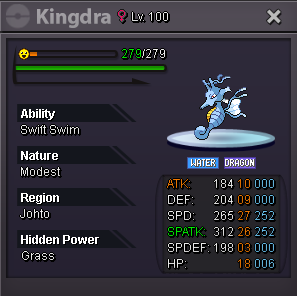
Start bid : 150 k Increase bid : 50k Auction will end the 17th September at 10:00 (France time) If the final price does not suit me, i am reserve the right to cancel the auction.