




New Trade Zone
Trade Zone is now live
Use the new Trade Zone for auctions and instant-price trades so Pokemon and item offers are easy to find.


Cruelgreen
Registered User
-
Joined
-
Last visited
Everything posted by Cruelgreen
-
pokemon : chansey or happiny ivs : def 27+ , spdef 27+ , hp 27+ other ivs doesn't matter nature : bold , impish ability : natural cure budget : up to 2.5m discord contact : Reina#8673 show your pokemon at here or pm in discord write your price
-
Kaiji season 2 currently (actualy rewatching , really good anime that's why)
-
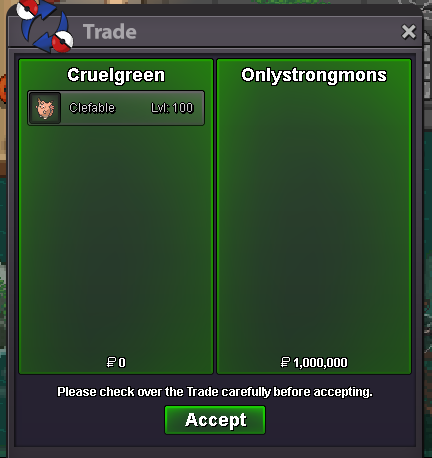
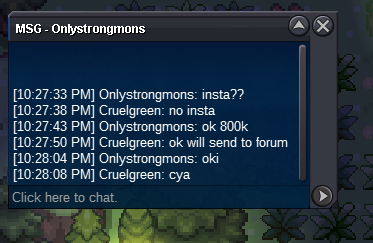
ı can offer 800k for that gallade discord : Nagito#5486
-
time out winner is @Onlystrongmons don't know why ı can't tag*Bump* around 7 hour 24 minute leftthe anime you are currently watching not the animes you watched*erased*startı added insta after auction started on my many auction and there wasn't any problem but anyway so ı will delete insta*deleted*STARTED : C.O 200K
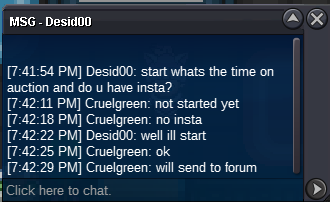 S.O : 200K MİN BİD : 100K ENDS : 48 HOUR AFTER FİRST BİD ends at : november 2 // 7 : 42 : 22 pm(gmt +3) discord : Nagito#5486 if winner from gold need to pay extra 420k for my transfer to gold or need transfer to silver
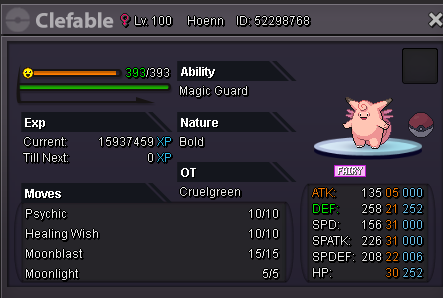 1.4mif somone bids in last 15 minutes , it extends 15 minute right ?startputting the time it ends and your gmt / utc is engough don't need to show timer a few times in a houris it ended or about to end ?you mean "start" ?reminds me my mudkip hunting 4 mudkip in a row... but all trash...NOı can do this forever.

Account
Navigation
Search
Configure browser push notifications
Chrome (Android)
- Tap the lock icon next to the address bar.
- Tap Permissions → Notifications.
- Adjust your preference.
Chrome (Desktop)
- Click the padlock icon in the address bar.
- Select Site settings.
- Find Notifications and adjust your preference.
Safari (iOS 16.4+)
- Ensure the site is installed via Add to Home Screen.
- Open Settings App → Notifications.
- Find your app name and adjust your preference.
Safari (macOS)
- Go to Safari → Preferences.
- Click the Websites tab.
- Select Notifications in the sidebar.
- Find this website and adjust your preference.
Edge (Android)
- Tap the lock icon next to the address bar.
- Tap Permissions.
- Find Notifications and adjust your preference.
Edge (Desktop)
- Click the padlock icon in the address bar.
- Click Permissions for this site.
- Find Notifications and adjust your preference.
Firefox (Android)
- Go to Settings → Site permissions.
- Tap Notifications.
- Find this site in the list and adjust your preference.
Firefox (Desktop)
- Open Firefox Settings.
- Search for Notifications.
- Find this site in the list and adjust your preference.