New Trade Zone
Trade Zone is now live
Use the new Trade Zone for auctions and instant-price trades so Pokemon and item offers are easy to find.

Font
Registered User
-
Joined
-
Last visited
-
start
-
3.5 M
-
-
Hey I'll get this one tomorrow when I'm free.
-
I am... I had to relog in like 20 + just to get the stability. It's time consuming btw sometimes I just have to leave it and get back on the other day.
-
I'm still experiencing this issue.
-
It's been 2 weeks already, when I log in it get stucked on the loading screen, it keeps on loading until I get disconnected. I need to re log and re open the client so I can log in but it is time consuming for me. My internet is working fine I'm using LAN. When I click the log in it says "selecting the best proxy" and loads simultaneously until I get disconnected (connection lost).

-
-
-
Nature: timid with good speed 🙂
-
500k 😄 if allowed?
-
Nature and Ivs doesn't matter.
-
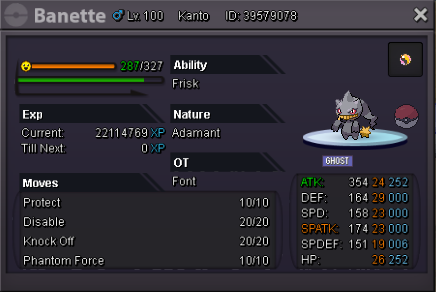
I have the banette pic holding a mega stone (turned mega during wild battle), I was doing a wild battle to test the moves but i suddenly got disconnected, after that, I logged in and my Banette turned into shuppet, this happened twice already I don't want to spend mysterious candies if in case this one happens all the time I will be broke.