- Reroll dc
-
PvP Quest suggestions
Agreed, also what if you reroll the ivs of a huntable pokémon and it only gets worse? You gonna look for a better one anyway, right? That to me is the whole point of hunting, for the satisfying feeling you get when you find a really good one after hunting for hours/days/weeks.
-
Close now
- Close now
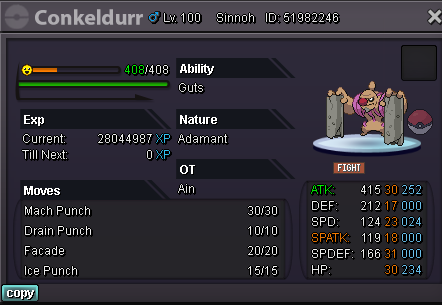
@Paprikaflow congrats you're the winner contact me whenever you are able to pick up Conkeldurr- Close now
- Close now
- Close now
- Close now
- Close now
- Close now
- Close now
- Close now
Lowered start offer from 2m to 1m Lowered duration time from 48hrs to 24hrs Good luck- Close now
AUCTION WINNER - Paprikaflow (1.6m) Hello I am auctioning this Conkeldurr s.o: 1m insta: no insta min bid: 200k C.O: 1.6m by Paprikaflow accept: Pokedollars coin capsule - 400k reroll ticket - 700k Auction end: 24hrs after first bid (will add timer) https://www.timeanddate.com/countdown/to?iso=20211020T1356&p0=48&msg=Conkeldurr&font=serif Contact: Discord: Ain#0069 Ingame: Ain- Rharomy's Gen1&2 Shiny Collection
Damn that shiny collection is pretty impressive gl finding all the rest- a suggestion for PRO for ipad
+1 also an iOS user and it would be nice to be able to play PRO on the go. - Close now
Account
Navigation
Search
Configure browser push notifications
Chrome (Android)
- Tap the lock icon next to the address bar.
- Tap Permissions → Notifications.
- Adjust your preference.
Chrome (Desktop)
- Click the padlock icon in the address bar.
- Select Site settings.
- Find Notifications and adjust your preference.
Safari (iOS 16.4+)
- Ensure the site is installed via Add to Home Screen.
- Open Settings App → Notifications.
- Find your app name and adjust your preference.
Safari (macOS)
- Go to Safari → Preferences.
- Click the Websites tab.
- Select Notifications in the sidebar.
- Find this website and adjust your preference.
Edge (Android)
- Tap the lock icon next to the address bar.
- Tap Permissions.
- Find Notifications and adjust your preference.
Edge (Desktop)
- Click the padlock icon in the address bar.
- Click Permissions for this site.
- Find Notifications and adjust your preference.
Firefox (Android)
- Go to Settings → Site permissions.
- Tap Notifications.
- Find this site in the list and adjust your preference.
Firefox (Desktop)
- Open Firefox Settings.
- Search for Notifications.
- Find this site in the list and adjust your preference.