




New Trade Zone
Trade Zone is now live
Use the new Trade Zone for auctions and instant-price trades so Pokemon and item offers are easy to find.

Alexitof
Registered User
-
Joined
-
Last visited
Everything posted by Alexitof
-
Alexitof, gold
-
Alexitof, gold server
-
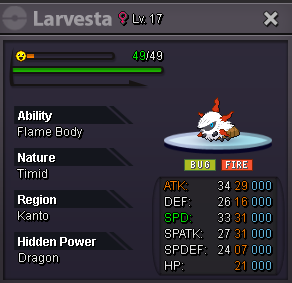
Auction has ended. @Glorofindel7 is the winner. Please contact me to complete the trade. @Tushar07 Your offer of 430k was made after the auction ended and thus it's invalid.Auction details Starting offer: 200k Minimum bid: 20k Auction ends 48h after first bid Accepted payment Pokedollars Coin Capsule: 450k Reminder- If a bid is received in the final 15 minutes of the auction, the end point will be delayed by 15 minutes from that bid, and will be delayed by 15 minutes for each new bid thereafter, until the current offer has been held for a full 15 minutes.
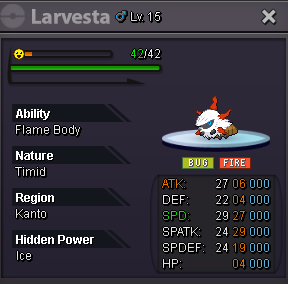
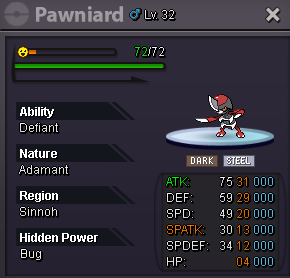
 The rule is stated at the auction rules. As for the offline mode, I forgot that I put it on during egg basket hunting, so I apologise for that.It's the 15min rule, in case you are wondering.bumpbumpBumpAuction details Starting offer: 500k Minimum bid: 20k This is a bundle auction. Winner wins all Pokémon. Auction ends 48h after first bid Accepted payment Pokedollars CC: 500k Reroll ticket: 550k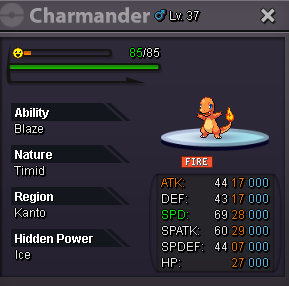
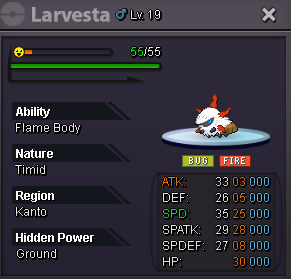
 Greetings! I don't know if it intended, but I find it very frustrating when my fainted sync gets revived when I use escape rope. As this isn't the case in the original games I'd like to suggest that escapes ropes teleport you outside of last visited Pokecenter with the health bars of the Pokemon in your party as they were before using it, and let nurse Joy do what she knows best. The same applies for the Hoenn teleportation system.Auction ended, @Yoo1992is the winner. Please contact me to complete the trade.the current offer is 340k and the min bid is 20k. Did you mean 360k?Auction details Starting offer: 300k Minimum bid: 20k Insta: 2m Auction ends 48h after first bid Accepted payment Pokedollars CC: 450k Reroll ticket: 500k
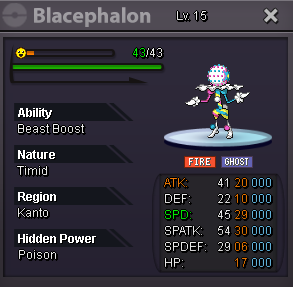
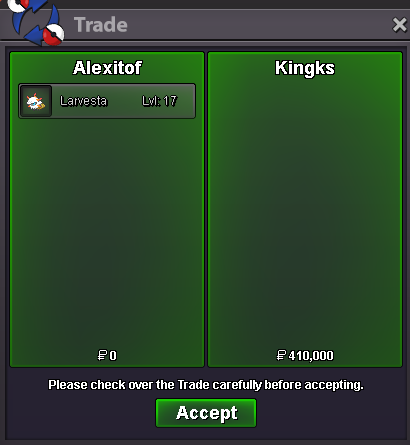
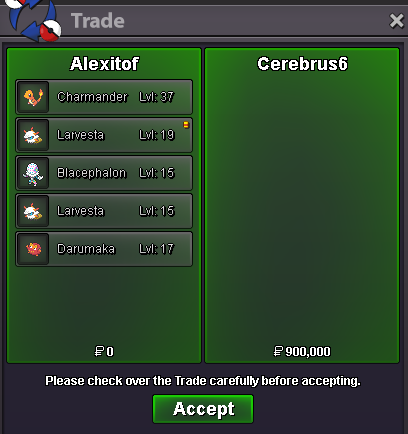
 Auction ended, @Pablindugrau444 is the winner with 300k. Please contact me to complete the trade. @Zapkanthegod your bid was made at 7/3/25 3:39am gmt+2, which is after the end point of the auction (7/3/25 2:48am gmt+2).Auction details Starting offer: 50k Minimum bid: 1k This is a bundle auction. Winner wins both Pokémon. Auction ends 12h after first bid Accepted payment Pokedollars CC: 450k Reroll ticket: 500k







Account
Navigation
Search
Configure browser push notifications
Chrome (Android)
- Tap the lock icon next to the address bar.
- Tap Permissions → Notifications.
- Adjust your preference.
Chrome (Desktop)
- Click the padlock icon in the address bar.
- Select Site settings.
- Find Notifications and adjust your preference.
Safari (iOS 16.4+)
- Ensure the site is installed via Add to Home Screen.
- Open Settings App → Notifications.
- Find your app name and adjust your preference.
Safari (macOS)
- Go to Safari → Preferences.
- Click the Websites tab.
- Select Notifications in the sidebar.
- Find this website and adjust your preference.
Edge (Android)
- Tap the lock icon next to the address bar.
- Tap Permissions.
- Find Notifications and adjust your preference.
Edge (Desktop)
- Click the padlock icon in the address bar.
- Click Permissions for this site.
- Find Notifications and adjust your preference.
Firefox (Android)
- Go to Settings → Site permissions.
- Tap Notifications.
- Find this site in the list and adjust your preference.
Firefox (Desktop)
- Open Firefox Settings.
- Search for Notifications.
- Find this site in the list and adjust your preference.