Skip to content
View in the app

A better way to browse. Learn more.

Pokemon Revolution Online

A full-screen app on your home screen with push notifications, badges and more.

To install this app on iOS and iPadOS
  1. Tap the Share icon in Safari
  2. Scroll the menu and tap Add to Home Screen.
  3. Tap Add in the top-right corner.
To install this app on Android
  1. Tap the 3-dot menu (⋮) in the top-right corner of the browser.
  2. Tap Add to Home screen or Install app.
  3. Confirm by tapping Install.
New Trade Zone
Trade Zone is now live
Use the new Trade Zone for auctions and instant-price trades so Pokemon and item offers are easy to find.
Open Trade Zone

Mingrenpro

Registered User
  • Joined

  • Last visited

Everything posted by Mingrenpro

  1. It's fine, since I'm in Gold, it's hard to talk in-game if none of us doing the transfer first, we can discuss here. I provide 2 kinds of services: one is for getting the pokemon Victini, the other is for getting the pokemon Meloetta, details for each of them are written in my first post of this Thread, however, ask me anything related that you need to know.
  2. Replied via in-game dm, re-scheduled the run to March, 27th, 2024, starting at 9 a.m (GMT+7)
  3. Hey there, you can dm my discord (hasekirie), we can talk there to clarify all of your doubts when I'm not online on the forum. *Side note: Customer List updated.
  4. @Overronz try looking for him at the entrance of Eindoak's Cave, where you fuse Kyurem with Zekrom/ Reshiram. I found him there in my case.
  5. Bump. Customer List updated. Divide the Customer List into "Pinkan Customer List" & "Victini Customer List".
  6. Bump. Added Victini's Dungeon service. Customer List updated.
  7. Bump. Customer List updated. Also flexing the nearest catch of my lucky customer below:
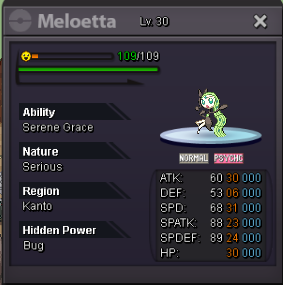
  8. Bump. Brand-opening Discount (20%) removed. Customer List updated. Note: there can be other Discount in the future TBA
  9. Bump. Updated more successful customers. Reminder: the 20% discount will expire by 00:00 (GMT+0) on March 18th, 2024
  10. Hello Trainers, I'm selling the Hoopa (Opening - newly added) & Pinkan & Victini Dungeon Service and Type-specific Z-Crystals in Gold Server *Price: - For Type-specific Z-Crystals Service: 200k each (i.e Dragonium-Z, Firium Z...) - For Hoopa Dungeon Service: Account-sharing Small Hoopa + 1x Ring of Desire 750k 1x Ring of Desires (for Hoopa-unbound) 500k 2x Rings of Desires (for Hoopa-unbound) 900k 3x Rings of Desires (for Hoopa-unbound) 1.3m 4x Rings of Desires (for Hoopa-unbound) 1.7m 5x Rings of Desires (for Hoopa-unbound) 2m Small Hoopa + 6x Ring of Desire: 2.5m (Account-sharing) * Accepted payment: Cash & CC (470k) ------------ - For Pinkan Dungeon Service: - 800k for all other customers - 600k for Ascension Guild members * Accepted payment: Cash & CC (460k) ----------- - For Victini Dungeon Service: 1.3M to every customer ----------- *Contact: - My IGN: Mingrenpro (Gold server) - My discord: HaseKirie (HaseKirie#9418) *Previous customers: - Z-Crystals Customer List: Spoiler - Hoopa Customer List: Spoiler - Pinkan Customer List: Spoiler - Victini Customer List: Spoiler *Details as below: *For Type-specific Z-Crystals service: Spoiler *For Hoopa Dungeon: Spoiler *For Victini Dungeon: Spoiler *For Pinkan Dungeon: Spoiler
  11. I can clarify your doubt like this: Marley and Sabito12 were in the same category of 900k, the moment Sabito paid me 2x CCs, he did buy them at 450k each and this thread have yet to be posted to price CC as 400k. As for different combination than what's listed, it will just fall into the lowest possible announced price at max, which is 600k before 20% discount. Transparency here is that you won't have much trouble finding which category you belong to, if in doubt, can just ask me.
  12. I'm afraid that "discount privately" part is not transparent enough and will leave a bad impact for future customer when they look at the "previous customer part" and see inconsitency in the pricing, that's why I made it clear from the start.
  13. Thanks for the suggestion, wording issue. I have yet to come up with a more suitable wording; feel free to suggest one.

Account

Navigation

Search

Search

Configure browser push notifications

Chrome (Android)
  1. Tap the lock icon next to the address bar.
  2. Tap Permissions → Notifications.
  3. Adjust your preference.
Chrome (Desktop)
  1. Click the padlock icon in the address bar.
  2. Select Site settings.
  3. Find Notifications and adjust your preference.