




New Trade Zone
Trade Zone is now live
Use the new Trade Zone for auctions and instant-price trades so Pokemon and item offers are easy to find.
.png.e172022d4706d8e8d6fad198b74be4d4.png)

Mingrenpro
Registered User
-
Joined
-
Last visited
Everything posted by Mingrenpro
-
Bump.
-
Bump.
-
Bump. Customer List updated.
-
Bump. Customer List updated.
-
Bump. Customer List updated.
-
I'd also suggest 2 things on this: - a ticking option on the login screen that allows 'log in anonymously': it's just like when you're actually online but setting your online status to 'offline' - if your login status is now 'offline', or the 'anonymous login option' is ticked, you won't receive any system notifications when player in your friend list has just logged in. This helps avoid the too laggy situation when friend keep relogging.
-
Bump. Customer List updated.
-
Bump. Customer List updated.
-
Re-opening shop. Adding Hoopa dungeon service. Pausing Victini & Pinkan Dungeon service

-
It's a paid feature after all, the benefit is to save you the time of cleaning trash mon from your PC the manual way. People pay for solution to save their time, and that is just fair trade. If the releasing cost concerns you, pick a better time to enjoy it, when a buff of '1 pokedollar releasing cost' appears on the screen (usually during event time) for example. Good stuff has it own price.
-
1.14 M
-
I can start if the start price got adjusted to 1m.
-
Customer List updated. Also, I will now close the shop temporarily due to IRL work. But will reopen it again in the future, when I can manage the time to do so. Many thanks to all my precious customers and teammates for making it happen. It's not goodbye, that's for sure. Note: I'm not taking any new orders for now, except those existing orders that haven't finished will be completed tomorrow as promised.
-
Bump. Customer List updated.
-
Bump.
-
Bump.
-
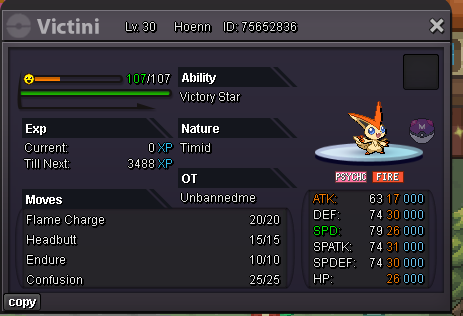
Bump. Customer List updated. Also flexing a new catch of a customer using my service.
-
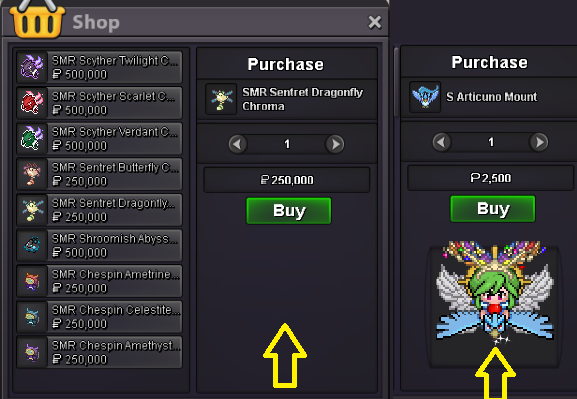
I suggest adding a preview window for all Chroma Shop, similar to that of the PvP/ PvE shop, so player can make informed decision upon purchasing. The image doesn't have to turn around, just a static one as in pokemon card should be fine.
-
Bump.
-
Bump.
-
Maybe just upgrade a button like 'call back' that act as a request (lasting for 1/3 of the initial lending time for example) sent to the Borrower: - If the Borrower is active and refuse to such request, then the request will be voided & the lending time stay unchanged as initially agreed by both sides. - If the Borrower is inactive and can't react to the request at all, then the Lender will have the option to call back the lended Mon after x days after sending the request (x = half of the remaining time for example, so the request cuts the remaining time in half if success) An example: A lend a Pikachu to B for 10 days. At day 3, A want to transfer so he send the 'call back request', this request will be lasting 3 days (1/3 of the initial lending time) for the Borrower to react. If the Borrower is active and refuse to such request during the active requesting time (day 3+4+5), then the call back request is voided. If the Borrower is inactive and can't react to the call back request at all, then by the end of day 5 (deadline of the call back request), the remaining time (5 days) will be cut in half, so there're 2.5 days left (reducing 2.5 days) until the pokemon is returned Still, there will be problem if the initial lending time is too short, maybe this call back option is only applicable to the 'long enough' lending time (x days above).
-
wooper 1.7M
-
wooper 1.5m
-
wooper 1.3M
-
wooper 1.1m
