




New Trade Zone
Trade Zone is now live
Use the new Trade Zone for auctions and instant-price trades so Pokemon and item offers are easy to find.


Taelfan
Registered User
-
Joined
-
Last visited
Everything posted by Taelfan
-
Taelfan - Silver server
-
400k
-
Boss lending service & egg move tutor service is still open!
-
220k 2nd ferro
-
-
400k
-
Yep..
 Congratulations @1cloudz! You have won a 30x5 IV Meowstic for only 1 Pokedollar! Man, what a steal. Anyway please do let me know where and when you would like to meet.Min bid 1 and start bid adjusted to 1 as well. Have fun200k I'm late aren't i... Nevermind my bidHeheLowered s.o and minimum bidStart Price : 1 Minimum Bid : 1 End Time : 5hours after First Bid Accepted Payments: Pokedollars, Coin Capsules (x1 Coin Capsule = 430k), IV Reroll Tickets (x1 IV Reroll Ticket = 500k), Rare Candy (x1 Rare Candy = 6k).
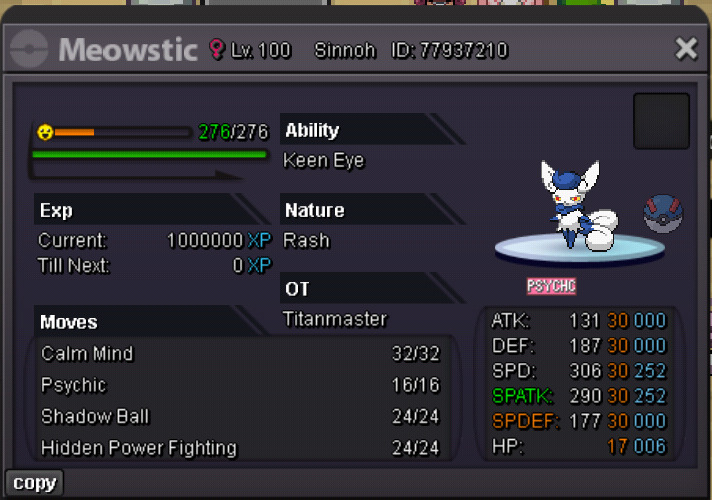 Start bagonTrade done
 U won, lmk when u can come onlineBumpIt's a client bug, you can try downloading the game again to fix it
 Bump
Bump






Account
Navigation
Search
Configure browser push notifications
Chrome (Android)
- Tap the lock icon next to the address bar.
- Tap Permissions → Notifications.
- Adjust your preference.
Chrome (Desktop)
- Click the padlock icon in the address bar.
- Select Site settings.
- Find Notifications and adjust your preference.
Safari (iOS 16.4+)
- Ensure the site is installed via Add to Home Screen.
- Open Settings App → Notifications.
- Find your app name and adjust your preference.
Safari (macOS)
- Go to Safari → Preferences.
- Click the Websites tab.
- Select Notifications in the sidebar.
- Find this website and adjust your preference.
Edge (Android)
- Tap the lock icon next to the address bar.
- Tap Permissions.
- Find Notifications and adjust your preference.
Edge (Desktop)
- Click the padlock icon in the address bar.
- Click Permissions for this site.
- Find Notifications and adjust your preference.
Firefox (Android)
- Go to Settings → Site permissions.
- Tap Notifications.
- Find this site in the list and adjust your preference.
Firefox (Desktop)
- Open Firefox Settings.
- Search for Notifications.
- Find this site in the list and adjust your preference.