New Trade Zone
Trade Zone is now live
Use the new Trade Zone for auctions and instant-price trades so Pokemon and item offers are easy to find.

Rogue005
Registered User
-
Joined
-
Last visited
Everything posted by Rogue005
-
-
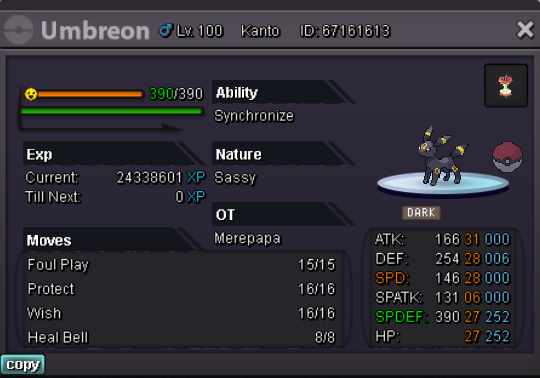
C.O - 1m min raise - 200 k NO INSTA payment method - pokedollars , CC(400 k ) , RR (700 k) ends after 5 days , after the first bid

-
BUMP
-
BUMP
-
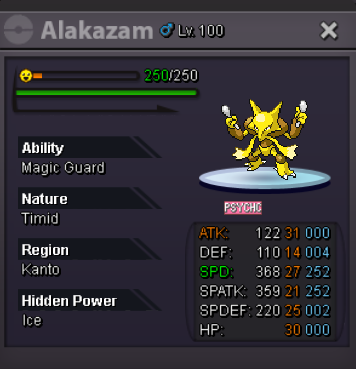
S.O - 1 M MIN RAISE - 200 K NO INSTA PAYMENT METHODS - POKEDOLLARS , CC (400 K) , RR (700 K) ENDS AFTER 72 HRS AFTER 1ST BID
-
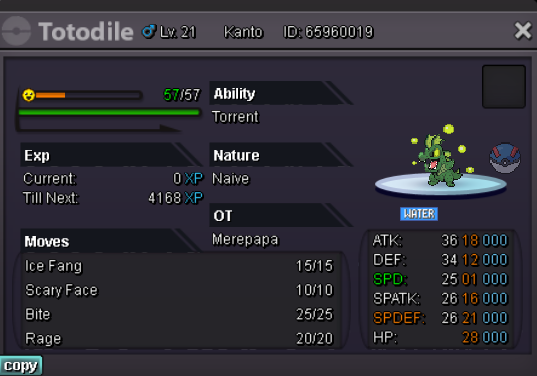
S.O - 1 M Min Raise - 200 k Insta - 3m payment methods - pokedollars , CC (400 k ) , RR (690 k) Auction ends after 48 hrs after first bid
-
Sold
-
NotedNotedBumpIts already at 1 m 🙂NotedC.O - 1 .2 m min bid - 100 k 3 m insta payment accepted in - pokedollars CC (400 k) , RR (690 k) 2 hrs
 BUMPBUMPpayment methods - pokedollars , CC(400k) and iv RR (700k) All auctions end after 3 days after the first bid MIMIKYU 1 S.O - 150 k min raise - 50k no insta S.O - 250 k min raise - 50k no insta
 BUMPBUMPS.O - 300 k min raise - 100 k no insta payment methods - pokedollar , CC (400 k) time - 3 days after first bid
 bumpAuction endedi just tried with other device and with vpn , i also previously tried with other browser , the time everywhere is not of my region , and also srycan i get a reply plzi also checked on another browser , the time is still wrong on forums on that browser too