New Trade Zone
Trade Zone is now live
Use the new Trade Zone for auctions and instant-price trades so Pokemon and item offers are easy to find.

Lacomus
Registered User
-
Joined
-
Last visited
Everything posted by Lacomus
-
Bump
-
Bump
-
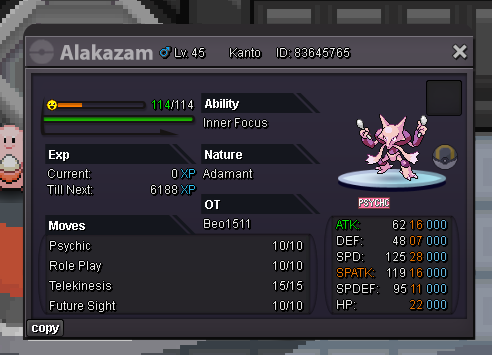
Auction Details: Start Price: 12m End Point: 48 hours (after start price is met) Insta Price: N/A Minimum Raise: 100k Accepted Payments: Pokedollars, Coin Capsules (x1 Coin Capsule = 450k), IV Reroll Tickets (x1 IV Reroll Ticket = 550k) Important Reminders: This is a Cross Server auction. You may bid from any server, and I will transfer to your preferred server upon winning. If you intend to purchase with an alt account, specify the account alongside your bid. If a bid is received in the final 15 minutes of the auction, the end point will be delayed by 15 minutes from that bid, and will be delayed by 15 minutes for each new bid thereafter, until the current offer has been held for a full 15 minutes. Happy Bidding!

-
Start 50k
-
Bump
-
Alt account: Sumocal (Silver) PvP Chests: Battle, Win, and Earn Exclusive Rewards! - Announcements - Pokemon Revolution Online Auction Details: Start Price: 5m End Point: 72 hours (after start price is met) Insta Price: N/A Minimum Raise: 200k Accepted Payments: Pokedollars, Coin Capsules (x1 Coin Capsule = 450k), IV Reroll Tickets (x1 IV Reroll Ticket = 550k) Important Reminders: This is a Silver Server auction. However, you may bid from any server, and I will transfer to your preferred server upon winning. If you intend to purchase with an alt account, specify the account alongside your bid. If a bid is received in the final 15 minutes of the auction, the end point will be delayed by 15 minutes from that bid, and will be delayed by 15 minutes for each new bid thereafter, until the current offer has been held for a full 15 minutes. Happy Bidding!


-
Start 50k
-
@Karthik190 wins.
-
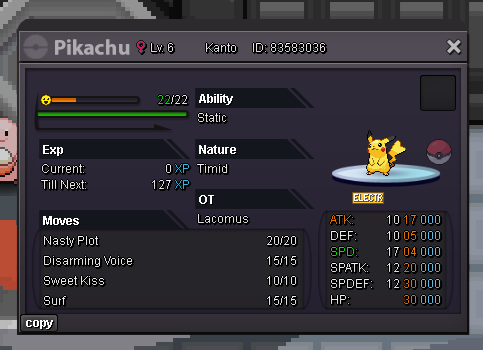
CLUES: This custom moveset includes 2 status moves and 2 special attack moves. Surf, Disarming Voice, Nasty Plot...(1 more!).
-
Ok...maybe this will do it. Nasty Plot, Surf, Disarming Voice... One more.
-
3m
-
CLUES: This custom moveset includes 2 status moves and 2 special attack moves. One of the status moves is "Nasty Plot", and one of the special attack moves is "Surf". Someone nearly got it (missed by 1).
-
Time to drop some more help. One of the status moves is "Nasty Plot", and one of the special attack moves is "Surf". 50% of it is now done. No more clues
-
And it wasn't @Tjdj
-
CLUES: This custom moveset includes 2 status moves and 2 special attack moves. One of the status moves is "Nasty Plot". Someone nearly got it (missed by 1).
-
Nasty Plot, Agility, Thunderbolt, Thunder Shock
-
@Fahimop1999 Its moves that Pikachu can actually learn in-game, not random moves like "Shadow Ball" etc.
-
Nasty Plot, Thunder Wave, Thunderbolt, Volt Switch
-
Nasty Plot, Growl, Electro Ball, Charge Beam
-
Nasty Plot, Rain Dance, Thunderbolt, Hidden Power Ice. I'm playing too (why not).
-
CLUES: This custom moveset includes 2 status moves and 2 special attack moves. One of the status moves is "Nasty Plot".
-
Update: To keep the flow going, anyone can have a try.
-
If you’re unsure about the value of a Pokémon, mount, or cosmetic, here’s a quick way to get a reliable estimate Go to the Discord Trade Zone and use the search function to look up the name of what you have. Browse through current and past auctions to see what others have been selling it for. By checking several different listings, you’ll start to get a reliable sense of the typical price range. Like this: Guide: 10-Minute Price Check (Quick Scroll Example) Note: If you happen to own a shiny, form, mount, or cosmetic - and there’s little or no auction data available - consider putting it up for auction. Competitive Value Many past auction sales have been driven by demand from PvP-focused players, reflecting how much value the market places on competitive viability. Traits like nature, ability, and IVs are heavily influence a Pokémon’s price. While PvE is equally relevant, the market tends to reward PvP-ready Pokémon more relating to price. Rarity tier is also a factor - especially if the Pokémon is particularly difficult to hunt. The Visual Flex Shinies and special forms introduce an entirely new layer of complexity to pricing. Factors like rarity, visual appeal, and the event all play a role. Some forms provide useful utility - whether it’s for hunting (learning False Swipe), serving as syncs, playing a role in boss teams, or simply adding to a player’s collection. While non-form Pokémon can offer the same functions, having a unique skin or form adds a special appeal - and it’s something many players place value on. Some forms come from old events, while others are sought after in current ones. Additionally, specific chroma variants can be available for certain forms, which can drive up demand. In many cases, a shiny or form can be valuable purely due to rarity or aesthetics, regardless of nature, ability, or IVs. When those attributes are PvPable as well, the value can become especially high. Compare & Conclude When pricing or evaluating a Pokémon, compare it to similar past sales: If yours is better than one that sold for 1m, it could be worth more. If it’s worse than one that sold for 500k, its likely worth less. This comparison-based method helps you set fair price expectations and make smarter buy/sell decisions. Note: This method works best for Pokémon, where factors like nature, ability and IVs affect value. For mounts and cosmetics, where items are functionally identical, pricing needs less comparison - but market value can still fluctuate.
-
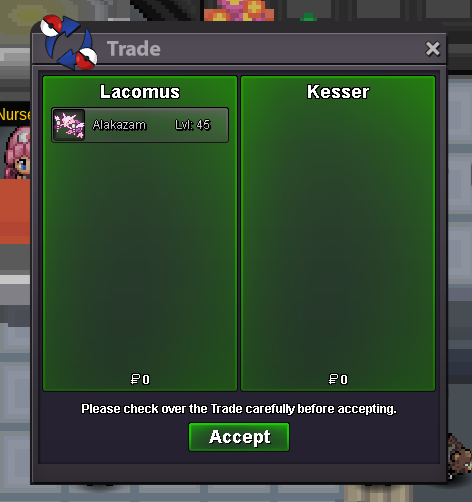
Correct answer is 44. @Kesser wins.