




New Trade Zone
Trade Zone is now live
Use the new Trade Zone for auctions and instant-price trades so Pokemon and item offers are easy to find.

1ec1uc
Registered User
-
Joined
-
Last visited
-
s.o: 750k min raise: 50k no insta 48 hour auction after s.o is met.

-
600k
-
2.2
-
Hi all, Deleted my boss golduck by accident, sorry about that. Could you please bring him home lol

-
Hello! As the title suggest I recently discarded a pokemon that is my false swiper that I really didnt mean to delete. Find the ID below, my username is 1ec1uc. thank you so much for your help, sorry about this!

-
750
-
550
-
200k
-
start
-
Trade completed, thread ready to be closed!
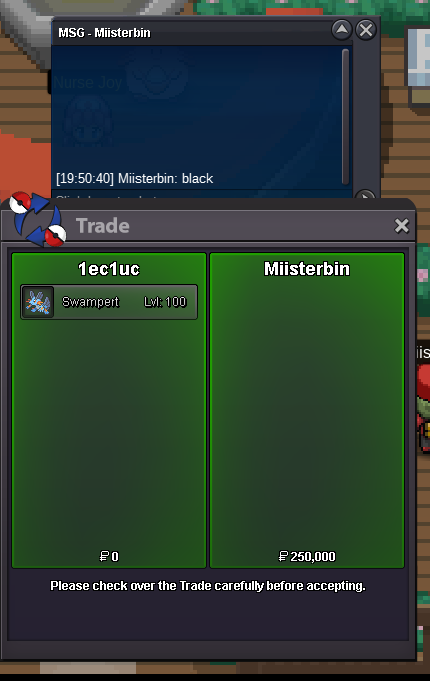
-
Auction closed at 250k, contact me on discord at lecluc or pm me here Blackmoon
-
-
-
Start Point: The auction starts at the starting price and will last 48 hours Start Offer: 200k Min. Raise: 25k Instant Price: N/A Auction Start time: Monday December 23rd 6:16 pm REMINDER: This is a Gold Server auction. If bidding from an alternative server, state that you will transfer upon winning. If you intend to purchase with an alt account, specify the account alongside your bid. If a bid is received in the final 15 minutes of the auction, the end point will be delayed by 15 minutes from that bid, and will be delayed by 15 minutes for each new bid thereafter, until the current offer has been held for a full 15 minutes. All fake offers will be reported. Bids cannot be withdrawn once placed. Accepted Payment: Pokedollars Coin Capsule = 450,000

-
Starting offer : 500k Minimum Bid : 50k 72 hours after starting offer No insta


