New Trade Zone
Trade Zone is now live
Use the new Trade Zone for auctions and instant-price trades so Pokemon and item offers are easy to find.

Marconix23
Registered User
-
Joined
-
Last visited
-
You are the winner!, where are you?, im in johto, can you come here?
-
Start

-
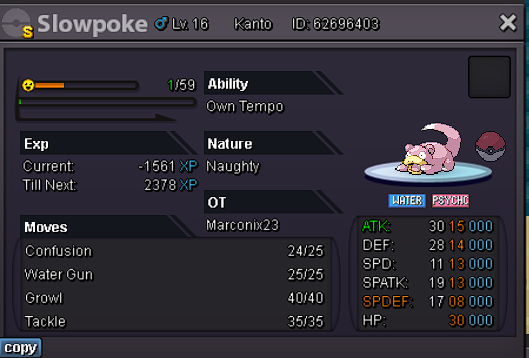
English: Auction Details: Start Price: 50k End Point: 72 hours (after start price is met) Insta Price: N/A (Buy it Now option) Minimum Raise: 5k Accepted Payments: Pokedollars Important Reminders: The auction will conclude in 72 hours (after start price is met), and bids must adhere to the minimum raise. The "Buy it Now" option allows you to secure the Pokémon, immediately at the Insta Price. If a bid is received in the final 15 minutes of the auction, the end point will be delayed by 15 minutes from that bid, and will be delayed by 15 minutes for each new bid thereafter, until the current offer has been held for a full 15 minutes. Español: Detalles de la subasta: Precio inicial: 50k Punto final: 72 hours (after start price is met) Precio instantaneo: N/A (Buy it Now option) Aumento minimo: 5k Pagos aceptados: Pokedolares Recordatorio importante: La subasta concluirá en 72 horas (después de que se alcance el precio inicial) y las ofertas deben cumplir con el aumento mínimo. La opción "Cómpralo ahora" te permite asegurar el Pokémon inmediatamente al precio Insta. Si se recibe una oferta en los últimos 15 minutos de la subasta, el punto final se retrasará 15 minutos desde esa oferta y se retrasará 15 minutos por cada nueva oferta posterior, hasta que la oferta actual se haya mantenido durante un tiempo completo. 15 minutos.