




Skip to content
View in the app

A better way to browse. Learn more.

Pokemon Revolution Online

A full-screen app on your home screen with push notifications, badges and more.

To install this app on iOS and iPadOS
  1. Tap the Share icon in Safari
  2. Scroll the menu and tap Add to Home Screen.
  3. Tap Add in the top-right corner.
To install this app on Android
  1. Tap the 3-dot menu (⋮) in the top-right corner of the browser.
  2. Tap Add to Home screen or Install app.
  3. Confirm by tapping Install.
New Trade Zone
Trade Zone is now live
Use the new Trade Zone for auctions and instant-price trades so Pokemon and item offers are easy to find.
Open Trade Zone

Jcraven

Registered User
  • Joined

  • Last visited

  1. Username:JCraven Server: gold Country/Timezone: -7 PDT
  2. Hi, I was doing the keldeo quest and following these guides https://pokemonrevolution.net/forum/topic/172733-keldeo-quest-guide-complete/ https://www.youtube.com/watch?v=ogIEpmnqv88 I get to the part where i have to beat the forest master boss, i beat him after a couple of attempts, then immediately escapre roped out. once i get to town i think i should be able to speak to the guards blocking the lords keep but they will not let me pass still. Not sure how to proceed.
  3. My apologies I missed this message, let me know when your next around to meet up
  4. In game name: JCraven Age: 25 Country: Canada Screen shot of your pokemon ID: What you love to do in PRO So far ive enjoyed farming for event/pvpable pokes, ev training and leveling them up. Hoping find some people to help me to get into PVP and do dungeons.
  5. What is your IGN: JCraven Highest rating achieved: New to pvp but excited to get started How old are you: 25 Discord ID: jcraven
  6. Your in game Name-JCraven Discord Name and Tag- JCraven#5572 Playtime hours-38hr Your Hobbies-Coding, gaming and soccer. Your Age-24 Your Country-Canada/England

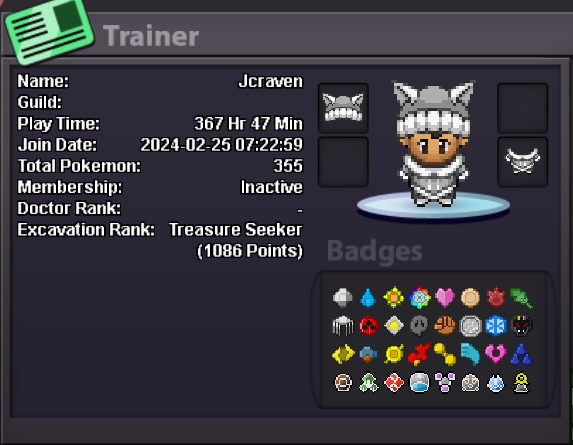
Account

Navigation

Search

Search

Configure browser push notifications

Chrome (Android)
  1. Tap the lock icon next to the address bar.
  2. Tap Permissions → Notifications.
  3. Adjust your preference.
Chrome (Desktop)
  1. Click the padlock icon in the address bar.
  2. Select Site settings.
  3. Find Notifications and adjust your preference.