




New Trade Zone
Trade Zone is now live
Use the new Trade Zone for auctions and instant-price trades so Pokemon and item offers are easy to find.


Goldking55
Registered User
-
Joined
-
Last visited
-
Services Open For Gold Server too Except Daycare
-
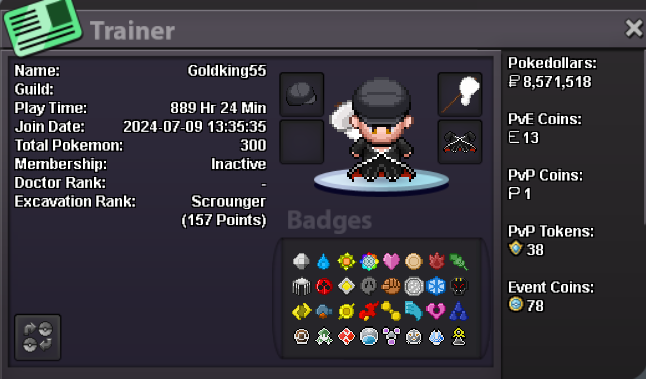
Hello there, I wish to apply for the Guild here is my application: What is your IGN? Goldking55 What is your discord username? DivineGold Tell us a little bit about yourself. I Work as Software engineer at Company in India, Just joined after the Post Graduate My strengths Patience and some time childish. I love to Play games, Code, Take Vlogs .. How many hours do you currently have? 895 hrs in Goldking and 3k+ in DivineGold account which is my main on Silver Do you know any members of Ascension and if yes who? Norex Have you been in a guild before, if so which one(s)? In Silver Trailblaze ..still being there in my silver account. Why do you want to join Ascension? While being as friend thought getting into Guild member would be good and supportive for the game. What are you doing when playing PRO, what do you enjoy the most and what are your goals? I mainly do excavations started few weeks ago and doing with it also enjoy grinding. Are you playing PvP, if so what are your goals or what did you achieve already? I do random PvP but not normal PvP but will do once i have a good PvP Team. Looking for a response Kind Regards, Goldking55/DivineGold
-
-
-
-
-
-
-
-
Hello there I wish to apply for the guild.. here's my info. what can you contribute to Dynasty? I am active , have some knowledge about pvp but only random pvp, Will do pvp too when i am online..just starting with pvp what is your real life and ingame name? Real: Dharun Ingame: Goldking55 how old are you and where are you from? I am 28 years old and am from India. discord tag? how often are you online there? divinegold55 and i am online every day
-
-
-
-
-