New Trade Zone
Trade Zone is now live
Use the new Trade Zone for auctions and instant-price trades so Pokemon and item offers are easy to find.

Ranger072
Registered User
-
Joined
-
Last visited
Everything posted by Ranger072
-
1. Yes, i plan to be playing regulary for a loong time 2. for now, i want to know more about Pokemon, as i've been a casual pokemon player all my life 3. i am active, granted i don't always write or chat, but i always check my discord for anything new. That's something i need to work on. 4.I plan to play daily if my work schedule allows it.
-
alright, thx for feedback, really hoped it could be resolved another way, guess i will try and get it from pallet town xD nothing to do about it 😉 thanks again for the quick response 😉
-
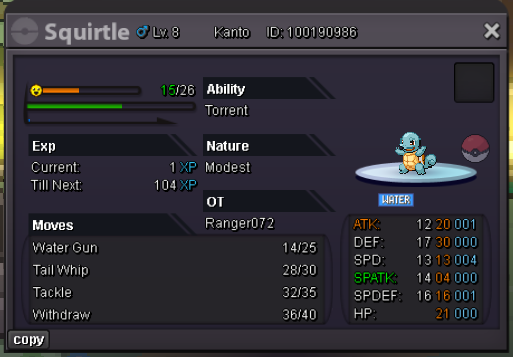
Hi i am a new player that just started. I picked my starter and left to do some battles made it to the first route in kanto, and regretted my choice for the starter. As there are no way to reset account short of making a new account, which i really would not, since i decided i want to support this game, and already bourght coins, i was wondering if there are anyway, i could switch to another starter, with the help from the Gm's or something, my starter is only level 8 so i haven't really played long. Really hope it is possible as i really would like to get a different starter. I will include a screen shot of my starter that also has the ID just so all information is here would like a Bulbasaur instead. Really hope it is possible, if not, then i would just have to live with it... Best regards Ranger072