




New Trade Zone
Trade Zone is now live
Use the new Trade Zone for auctions and instant-price trades so Pokemon and item offers are easy to find.


Achonk
Registered User
-
Joined
-
Last visited
Everything posted by Achonk
-
SOLD to Vastik by 4,6m, thank you

-
noted sir wait the reply from sir limit
-
-
-
-
noted sir 16 minutes until auction finish
-
-
C.o now is 2,2m 2hours left

-
I remind you, that minimal raise were changed to 200k, pls offer according to rules or i'll be in trouble. Thank you
-
-
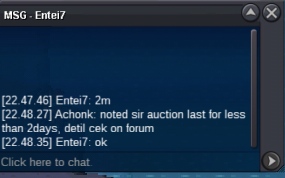
C.o now for 2m feom Entei7
-
your 1st bid is yesterday at 2am sir, the bid last 3days after your 1st bid means less than 2days
-
-
sorry done sir, feel free to offer nad thank you
-
Noted sir pls stay update
-
Noted if the admin agree for this and fine by me
-
Start bid from 1m Minimal raise 200k Insta price 10m Accept cc(400k) and rr (700k) 72hours auction start after first bid

-
Hmm i though shiny poke will get 400+ point :( [image]https://imgur.com/a/vsg0H[/image]
-
sorry, but the auction will be extended until reach expectation :) btw :thanks:
-
Want to sell this for good price, auction last 2 days or if i'm statisfied :Angel: c.o: - insta: - :thanks:
-
Chat Room is more confrontable now coz to disccus some matter of some player
-
I think it will be help to player if there is an option to sort pokemon in the box :)

