




New Trade Zone
Trade Zone is now live
Use the new Trade Zone for auctions and instant-price trades so Pokemon and item offers are easy to find.

Redlove3108
Suspended
-
Joined
-
Last visited
Everything posted by Redlove3108
-
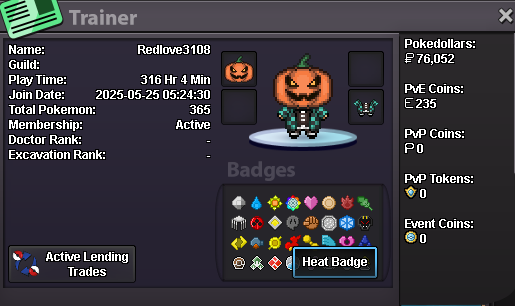
1. What's your Player name (IGN)? Redlove3108 2. Number of hours played? 300 hours, I'm still quite new to the game 3. What's your favorite Pokemon? Shiny gyarados and rayquaza, mawile too 4. What do you enjoy doing the most in PRO? (Hunting, Dungeons, PvP, trading, etc) Mostly hunting and doing bosses for self sustain (XD) 5. Screenshot of your Trainer Card 6. How long have you been playing Pokemon? (Optional) Since i was little 7. Favorite ice cream flavor. (Optional) Chocolate?
-
can we trade now, or pm me when u online, i also send a friend request on discord (i'm Duong)
-
wtb plague doctor mask
-
Can i have free quiet charizard XD?
-
wtb egg move service x3
-
nvm XD

