




New Trade Zone
Trade Zone is now live
Use the new Trade Zone for auctions and instant-price trades so Pokemon and item offers are easy to find.

Hoangle1
Registered User
-
Joined
-
Last visited
Everything posted by Hoangle1
-
4m
-
Hoangle1 gold
-
Hoangle1, gold Goodluck
-
Thanks you very much
-
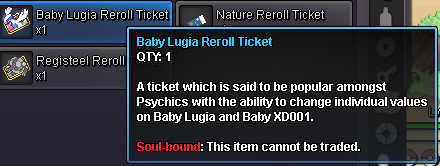
Hi On october 7th i posted a post about can i get my reroll back when using baby lugia reroll didn't work but took away 1 reroll ticket without losing baby lugia reroll ticket, i said it on discord bug report channel and that bug has been fixed so i don't know if i can get my reroll back. If yes can i get 1 reroll ticket of my lugia and replace reroll with it. Since i haven't got a reply yet so i post this post here today hoping for a reply.

-
IGN : Hoangle1 Time zone : GMT+7
-
Up
-
Hey the thing i found out i could reroll baby lugia xd001 after catching it so i tried to reroll and it ending up using my reroll non-untrade reroll ticket form 2 to 1. Hope this can be resolved Many thanks.
-
I’ve experienced him service, and both the product quality and the way customers are treated are really nice.
