




New Trade Zone
Trade Zone is now live
Use the new Trade Zone for auctions and instant-price trades so Pokemon and item offers are easy to find.

Avikash
Registered User
-
Joined
-
Last visited
-
-
I'm guessing it was sold to the other guy, haven't heard from you in 24 hours
-
Milotic 800k
-
Milotic 600k
-
Am online now if can meet Hoenn Fallarbor pc? ign Avikash Edit: Trade completed. Thank you
-
200k Lucario
-
450
-
750k
-
Forretress 300k Torterra 150k
-
IGN will be Avikash and will be at Ecruteak pc Johto
-
4.2m
-
° what can you contribute to Dynasty? My time. Literally am available way more than I should be even as a newbie. ° what is your real life and ingame name? Avikash, prefer to be called Avi ° how old are you and where are you from? 30, from Canada ° discord tag? how often are you online there? Avikash, active on pc 10+ hours (wfh situation) and mobile 3+ hours ° screenshot of your trainercard
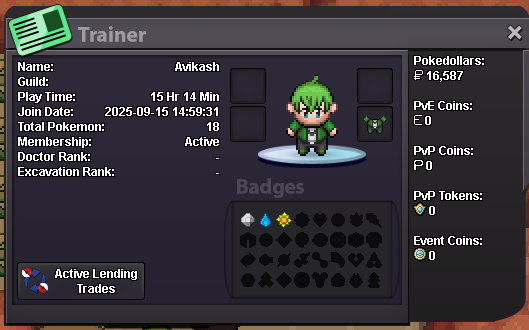
-
What is your IGN? Avikash Where are you from? Canada Highest rating achieved: N/A How old are you? 30 Discord ID: Avikash Why do you want to join Empire? Looking for an active english guild. Available quite a bit on discord as well. Planning to focus on PVP, currently learning the game

