




New Trade Zone
Trade Zone is now live
Use the new Trade Zone for auctions and instant-price trades so Pokemon and item offers are easy to find.

D1v1n3
Registered User
-
Joined
-
Last visited
-
Hello, I have been informed by the staff that I have to wait for 30 days or spend 100 coins to transfer again, I am fine with it as I have already made trade plans on the gold server now. You can mark this matter resolved, will reach back if I have any problems. Thank you for the follow up and support 🤗.
-
I request the creators to let this ban pass for once, as I had no idea about the trade rules, I have now read all the rules ad will follow the same. And I request to help me deliver the trade thread pokes to the respective bidders through cross server trade. Please help me complete my trade and also help the bidders get their rightful pokemons. Thank you
-
Hi all, I have currently been banned from trade, of which, I do not know the reason why as I am a new player and still learning the ways of this game. can anyone tell me how long does the ban last for? As I have active trade threads and will need to deliver. Thanks in advance. Would also appreciate if the creators help with the same.
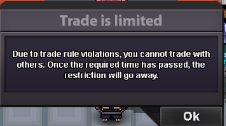
-
@Hallowglow Kindly help with the same :)
-
I accidently transferred my Silver server into gold, was trying to figure out how to merge the two accounts :) Is there any way i can undo the transfer now? Also please guide on how to merge servers.
