




New Trade Zone
Trade Zone is now live
Use the new Trade Zone for auctions and instant-price trades so Pokemon and item offers are easy to find.

Geceninrehberi
Suspended
-
Joined
-
Last visited
-
one last day for the auction have the highest offer belongs to cust32 which comes from silver with 25 million will there be a new champion ? or cust32 will be my champion. 😄 I don't know, but I'm waiting for your offers. one last day left 04/12/2020 gtm+3 00:00 will be end I wish everyone a good game ^_^
-
thank you, but that's not necessary, brother 😄 I mean, I could have done it myself ^^
-
closed
-
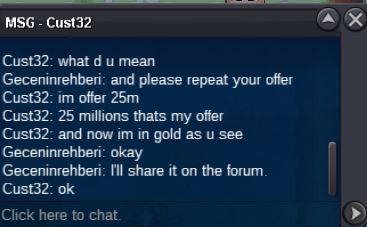
yes, we have a new champion 🙂 last incoming bid 25 m by Cust32 boys, I'm waiting for your offers. Thanks ^_^
-
I'm very sorry, sir. offers only apply to Gold server.
-
thank you very much, I'll be more careful. I wish you good work. Kindest regards 🙂
-
yeeeeeeeeeeeeeaaaaaaaaaaaaaahhhh looking for a new champion :)) who's gonna raise it ?
-
commotion1 start the 15 million come on guys

-
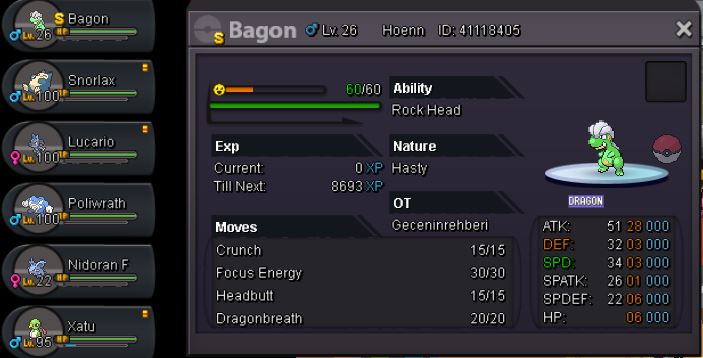
yeah, guys. ^_^ the starting price of this baby is 15 million minimum rise 5 million auction will last 7 days // start date 28.11.2020 // end date 04.12.2020 and time (gtm +3) 00:00 .ty 7.the winner of the day will be determined and sold i agree for cc 400k fake offers to be complained about I repeat, minimum rise 5 million instant price 75 million thank you all and await your offers ^^ silver server offers must come to gold server to receive Pokemon at the end of the auction .
-
in the game, someone bid 15 m, but I don't know waiting for your comments thanks ^_^

-
Can be closed.
-
Froakie sold for x5 CC ty.
-
1.3m
-
can be closed
-
politoed sold!
