




New Trade Zone
Trade Zone is now live
Use the new Trade Zone for auctions and instant-price trades so Pokemon and item offers are easy to find.

Keilep
Registered User
-
Joined
-
Last visited
Everything posted by Keilep
-
bump
-
yes my friend
-
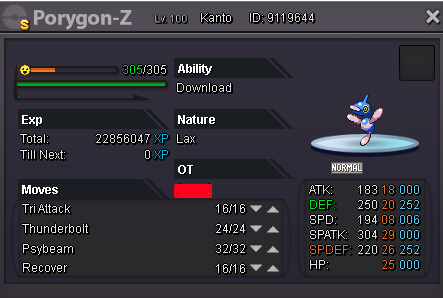
Hello Everyone i want to sell my shiny Porygon-Z Bo: start at 4m Insta price: 9m after 48hrs bo will receive his poke :D
-
What is your Discord tag? keilep#1252 How often do you use Discord? --Everyday If you could improve PRO's Discord with one suggestion, what would it be? --Adding more voice chat with members limit so that we can get to meet each other and enjoy the game better with a nice conversation + u can make more friends
-
Re: WTS Shiny Scyther ev trained only insta <t>do you accept 14m + shiny kabutops?</t>
-
Re: WTS Shiny Scyther ev trained only insta <t>10m my friend</t>
-
14M >D
-
WELCOME <i></i> 1 the bid start as soon as the is a bo and it will take 24hrs to finish after the first bid 2 i accept ms they worth 500k for me, 3 every offer has to be 100k diference 4 fake bidder will be reported 5 enjoy <i></i> ING: keilep <i></i> bo start in 900k <i></i>
-
12m <D
-
i offer 10m
-
ill offer 8m
-
fix your picture brother
-
Doesn't work that way. You have time limit and the starting price listed. If the starting price is met, and the time is runs out, whoever has the higher bid should be able to claim. What you did here classifies as fake sell Please keep this in mind and refrain from making the same mistake again in the future. For more info, check this thread out. so can i still get it?
-
new pokes added
-
ouch you hust me :Frown: :Frown:
-
400k from here brother
-
Re: Ada Shiny Karp (semi epic) 1m b.o. <t>1,1m bro</t>did i won?I start 1,5m300k gligar 300k ferroRe: WTS epic PVP <t>i start blissey</t>400k on gyaradosBUMP!! :Angel: