New Trade Zone
Trade Zone is now live
Use the new Trade Zone for auctions and instant-price trades so Pokemon and item offers are easy to find.

Afr0jas
Registered User
-
Joined
-
Last visited
Everything posted by Afr0jas
-
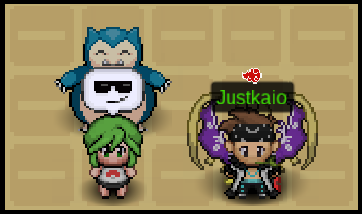
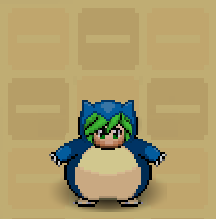
Greetings to Everyone! I would like to suggest a new Lunala Wings in Game to be add on the Cosmetic Department! I just realized that it feet really well and blend really nice at the back of a Trainer. I got this Idea after my friend got his LUNALA on the Birth island. we took a few selfie then i notice that the LUNALA was really awesome to watch. I hope that this could be added and in near future. just to bring a new positive way... ✦ A Special thanks to my friend Justkaio for allowing me to use this selfie as a Model Sample. ✦ I would also suggest a new costume since many already like to having Snorlax why could there be a costume as well. ✦ For the availability to where it could be purchased either (Coin Shop, PVE, PVP), but i think the Dev. can decide... ✦ I hope to see this in the future and am excited to have a new wings as a collections!
 Player name: Afr0jas Server: Gold Timezone: GMT +8
Account
Navigation
Search
Configure browser push notifications
Chrome (Android)
- Tap the lock icon next to the address bar.
- Tap Permissions → Notifications.
- Adjust your preference.
Chrome (Desktop)
- Click the padlock icon in the address bar.
- Select Site settings.
- Find Notifications and adjust your preference.
Safari (iOS 16.4+)
- Ensure the site is installed via Add to Home Screen.
- Open Settings App → Notifications.
- Find your app name and adjust your preference.
Safari (macOS)
- Go to Safari → Preferences.
- Click the Websites tab.
- Select Notifications in the sidebar.
- Find this website and adjust your preference.
Edge (Android)
- Tap the lock icon next to the address bar.
- Tap Permissions.
- Find Notifications and adjust your preference.
Edge (Desktop)
- Click the padlock icon in the address bar.
- Click Permissions for this site.
- Find Notifications and adjust your preference.
Firefox (Android)
- Go to Settings → Site permissions.
- Tap Notifications.
- Find this site in the list and adjust your preference.
Firefox (Desktop)
- Open Firefox Settings.
- Search for Notifications.
- Find this site in the list and adjust your preference.