




New Trade Zone
Trade Zone is now live
Use the new Trade Zone for auctions and instant-price trades so Pokemon and item offers are easy to find.

Kasterxd
Registered User
-
Joined
-
Last visited
Everything posted by Kasterxd
-
yes i have been transfer to gold
-
@Larfleeze
-
hello my issue is that my account is not anymore on silver , I requested a account transfer last month july 29th and I've got a notification after deadline aug 2nd that my request got cancelled because that deadline already passed so I got confused,anyways kept playing and found the shiny pokemon and so i wanted to start the auction in silver server forum trades. So then yesterday for some reason I got transfer to gold server and I thought I could cancel the auction just like that. Sorry for the incovenience I already message the bidders that I had an issue about the auction and server transfer. If there is a way to solve this problem. I would appretiate it. thanks. (attached picture of the notifications) https://ibb.co/9cnFtwm
-
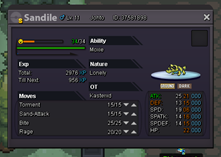
alt=97677https://pokemonrevolution.net/forum/index.php?attachments/1565056066466-png.97677/[/img] Hi guys. Starting price: 5 millions Current offer:- Ending bid: 5 days No insta price Available payments: Only pokedollars Minimum raise: 100k
-
Sorry the auction is canceled
-
Hi guys. Starting price: 5 millions Current offer:- Ending bid: 5 days No insta price Available payments: Only pokedollars Minimum raise: 100k
 SERVER TRANSFER Username:kasterxd Server to charge the money from: Silver Main Server to transfer: From Silver to GoldSERVER TRANSFER Username: kasterxd Server to charge the money from: Silver Main Server to transfer: Silver to Gold
