New Trade Zone
Trade Zone is now live
Use the new Trade Zone for auctions and instant-price trades so Pokemon and item offers are easy to find.

Kingsoccer
Registered User
-
Joined
-
Last visited
-
Tyranitar 400k
-
start swampert
-
-
Hi, I have a problem with the hotkeys. I have seen that there is a new feature regarding hotkeys where it changes when you are in battle. To test this, I have placed a pokeball at slot 1 for in battle hotkeys. After, I have done that, my hotkey 1 doesnt work anymore outside of battle. Not only that my 1 button doesnt work at all. For example when I am pressing attack and 1st slot move in pokemon battle. When I am pressing 1 for the interaction with the npc and obviously like I said before I can't use the hotkeys outside of battle (Mounts, fishing potions, etc) I hope you guys can fix this or disable the new feature because I use my 1 button alot in battle and outside battle. Therefore, I get very frustrated when I can't use it.
-
● What's your in-game name? kingsoccer ● How old are you? 19 ● Are you active in Discord? I check at least once everyday ● Where are you from? South Korea ● What's your total playtime? 1122 ● What's your goal in PRO? Have fun, kill time doing pvp ● What do you enjoy while playing the game? PVP trying to reach ladder ● Why do you want to be part of the guild? I want to play with different people and get motivation to do well in PVP ● What's your favorite Pokemon and why? Snorlax, most carefree pokemon
-
No its fixed now thanks for the help I was just fixed on the fact that I already had jirachi and forgot that I skipped a part in the jirachi quest. Thanks for the help. I was also hoping that maybe this can also be fixed since there is many ways to skip quests such as get a seen data of this pokemon. I had a confusing experience where I forgot which pokemons I have seen through the quest or before making the quest way harder and time consuming for me than it was supposed to be.
-
I have managed to get 300 evo data and I have finished jirachi quest and am a Hoenn champion. I interacted with the tv in the littleroot town, however it just says "Seems the blue pokemon is still roaming around." I go to the area where Latios is supposed to be but I see nothing. After that I go to Nikola since I thought I might have done something wrong, but it says that there will be no point in battling NIkola. Its weird because this is my first time reaching 300 evo data and it seems that I chose latios already looking at what the tv interaction says. So what is the reason for Latios not popping up for me?
-
Thanks your deactivating my anti virus worked before I extracted the game. However, I am not sure if I turn on my anti virus again, the same problem might occur again. But for now as it works I will report again. Thanks for the help.
-
I have tried it 3 times already... I believe its something to do with windows blocking the application but for some reason its only my computer that does it as it works fine for other computers.
-
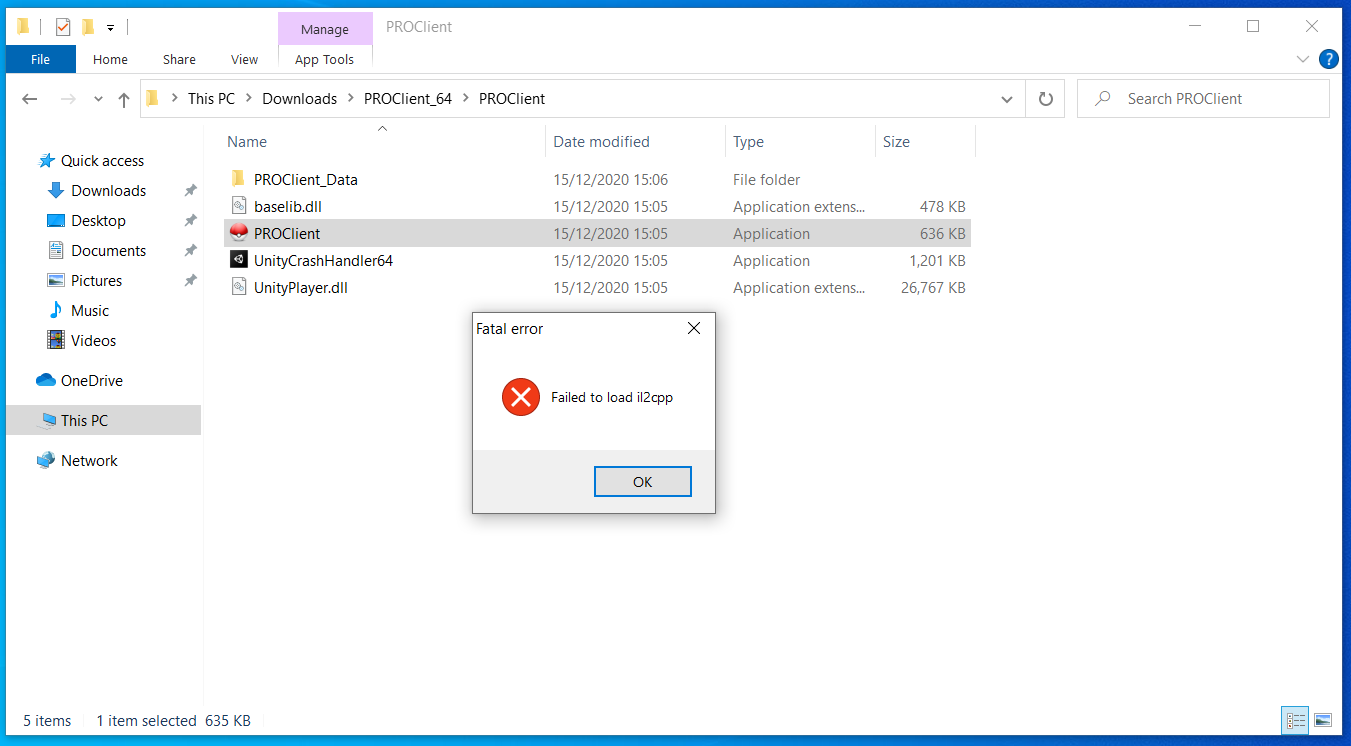
Hi I am windows user and for some reason the proclient started not working. There is an error when opening the client as it says "Failed to load il2cpp. I believe it is something to do with my windows sercurity and not the client itself. However, I just wanted to know if there is any way to fix this and if the staffs have a better idea.
-
thanks for your advice. It's working and now I got my account back. Thanks for the help Have a nice day! :)
-
i merged but it still doesn't work can you help me .