New Trade Zone
Trade Zone is now live
Use the new Trade Zone for auctions and instant-price trades so Pokemon and item offers are easy to find.

Adrian6789
Registered User
-
Joined
-
Last visited
Everything posted by Adrian6789
-
Hello!!! After the update, I checked my Pokémon storage and found that I am missing some Dratini. Please check and fix this for me.They are all the Pokémon I placed last in the box and just caught. Thank you very much!
-
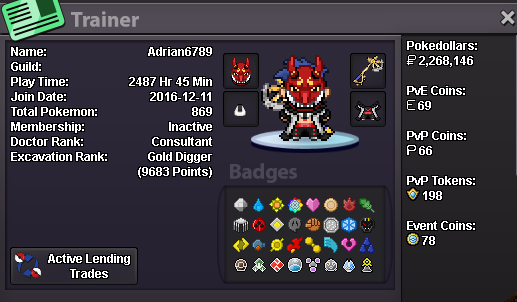
IG : Adrian6789 Country : VIETNAM I am 30 years old this year. I have been passionate about Pokémon since I was very young. Therefore, I consider P-R-O as my life. One thing that cannot be missed is that for the past 10 years, I have been trying my best every moment, no matter how little. I often spend a lot of time on hunting and sometimes on pvp , pve ... Hello to all my dear friends.
-
completed the auction

-
@Sanda08 You have won this auction. Can I meet you to finalize the transaction now?
-
2m6 .. 12min left

-
the final and only 15-minute extension
-
The auction will be extended by 15 minutes only if there is a bid in the last 10 minutes.
-
-
15 minutes left
-
-
-
-
-
-
@Herigod You have won. Please contact me to make the transaction.
-
-
Start at : 21h 30' 22/09/2025 End at : 21h 30' 24/09/2025 GMT +7
-
-
The auction ends in 5 hours.
-
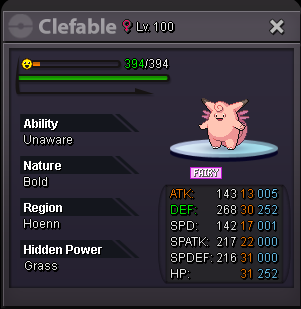
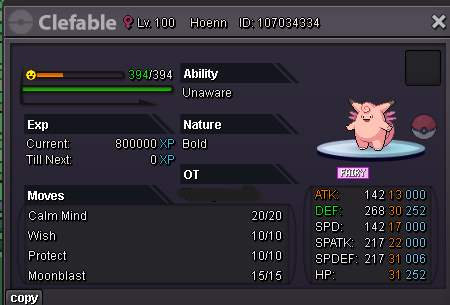
Start offer : 1m Min bid 100k Insta : No The auction lasts for 48 hours, starting from the first bid. Accepted payments : Reroll Ticket: 700k each. Nature Reroll: 300k each. Coin Capsule: 450k each. pokedollar Start at : 21h 30' 22/09/2025 End at : 21h 30' 24/09/2025 GMT +7
-
-
-
-
-