




New Trade Zone
Trade Zone is now live
Use the new Trade Zone for auctions and instant-price trades so Pokemon and item offers are easy to find.

Layout02
Registered User
-
Joined
-
Last visited
-
Everything worked perfectly! Thanks for the help and the effort. :-)
-
Hello man, thats perfect, please do that. PS: if you did it already, nothing has changed.
-
Hello and thanks for the quick feedback. Attached you can find my screenshot. As you can see i even own lvl 100 pkmns that i trained myself, while not having a single badge. Its true that the merge worked in terms of money and pokemons but my while progress of the past year is pretty much gone. I was in Sinnoh with a friend and even own Sinnoh pokemons, that i cought myself but all of the progress (badges n stuff) is gone.
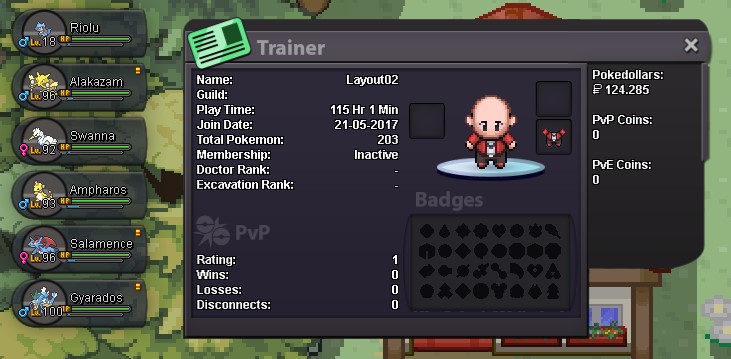
-
Hi, i accidentally chose the wrong server as my main account. Could you pls unmerge my account. Thanks