




New Trade Zone
Trade Zone is now live
Use the new Trade Zone for auctions and instant-price trades so Pokemon and item offers are easy to find.

Richardrochtard
Registered User
-
Joined
-
Last visited
-
900k
-
70k
-
WTB trash moxie sinnoh karp/gyara, any level. willing to overpay.
-
350k
-
-
After I tried again it works??I still have the scripted pokemons on my pc though. What should I do with them?
-
So, the problem here is the quest is bugged. Here's the story. I actually completed the normal mode last year, and this halloween I decided to try again the hard mode. Unfortunately, after I lost my first attempt, the quest bugged and I was told by the game to contact the staff. I got this text before I entered the 2nd portal (the portal to battle zone). I ignored it, and thought that it was something small. I kept on going and picked up the 4 pokemons in that battlefield, and start playing the quest game, to find out that it does not work (the message to report appeared again). Alright then, I then just surrendered, thinking that it was just a small bug. Now my team has those 4 pokemons, replacing my actual pokemons in my team. After I checked the PC, my pokemons are there, so I was relieved that 4 of my pokemons didn't just disappear. So, in conclusion, the quest is bugged, I can't play it, and I got 4 quest pokemons as a bonus. (Look at OT) Thanks!
.png.bb09d2b1ded75435ff168a296cec940d.png)
.png.beb5c66cd24ee1051bf394def6b9b8aa.png)
.png.003f0290a46623191eb54898e5b72ae8.png)
.png.f6a252c39d2f0d92599802ca3482b1b5.png)
-
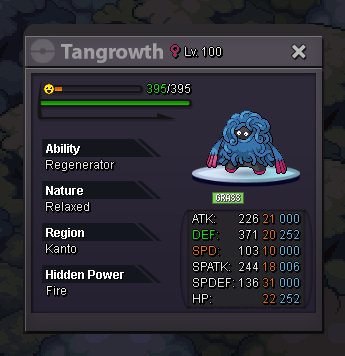
Relaxed H.A. Tangrowth 18+ HP Fire Price : 1.5m Accepted Payment : Pokedollars, CC(400k) Contact : IGN - Richardrochtard Discord - ProSaintBro#9078
-
start offer
