




New Trade Zone
Trade Zone is now live
Use the new Trade Zone for auctions and instant-price trades so Pokemon and item offers are easy to find.

Bodo
Registered User
-
Joined
-
Last visited
-
EATY please help me, i went to catch darkrai and couldnt due to full storage. Is there a way i can go catch it?
-
on attempting to catch darkrai during halloween event. I didn't notice my PC storage was full. And i lagged out attempting to catch it so had to sign out. Is there a chance to get it in the future?
-
Delete, Solved myself. wasnt same spot as i thought on the map provided on murkytown pokemon revolution wiki.
-
I remember doing this quest last time it was available, couldn't ever find the 3rd one because i got up to the ghoul swamp on the last day this event was active. So i can't locate the 3rd spirit. Please help me. Because i've looked at the possible spawn maps and cant find a single spot.
-
NAME CHANGE Current Username : BodoHenshaw New Username : Bodo Server to Charge money from : Silver
-
Close no offers
-
-
Message me on discord when your ready Bodohenshaw #3879
-
Bid over Chetero wins when can you come online?
-
Bid started ends 24 hours from now
-
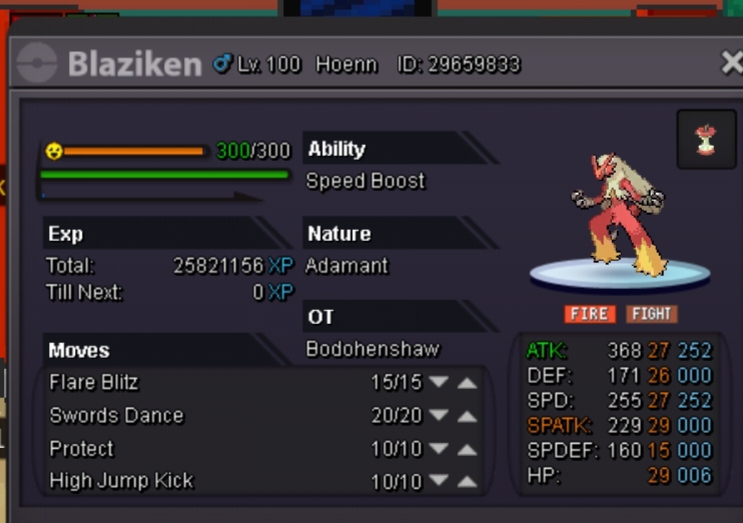
Start 500k Insta 2m Auction ends 24 hours after first bid
-
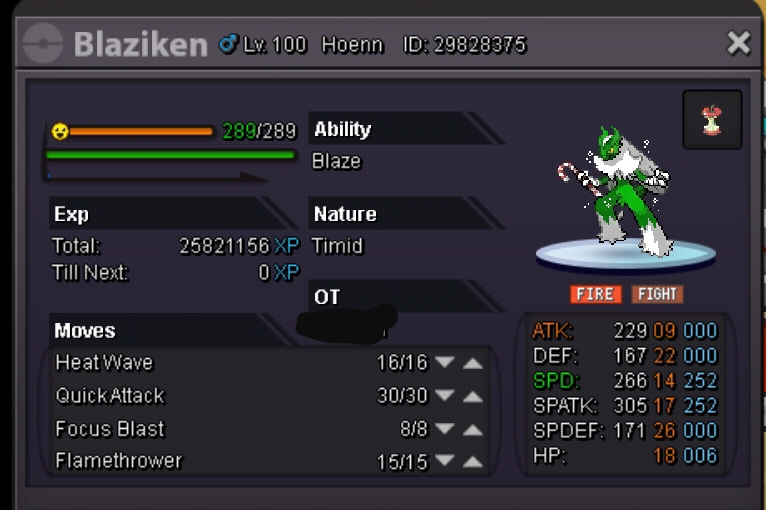
Start 6m Insta 10m Auction ends 48 hours after first bid
-
2.5m
-
Yeah I'm on
-
I'll insta munchlax