




Skip to content
View in the app

A better way to browse. Learn more.

Pokemon Revolution Online

A full-screen app on your home screen with push notifications, badges and more.

To install this app on iOS and iPadOS
  1. Tap the Share icon in Safari
  2. Scroll the menu and tap Add to Home Screen.
  3. Tap Add in the top-right corner.
To install this app on Android
  1. Tap the 3-dot menu (⋮) in the top-right corner of the browser.
  2. Tap Add to Home screen or Install app.
  3. Confirm by tapping Install.

Jolly max speed jangmo-o 15mins auction

ActiveSilverPokemonAuction
Nhojyaj28 Time left: Highest Bidder: Sharktapboi02
Start price
5.000
Instant price
-
Minimum bid
5.000
Current offer
75.000

Image of the Pokemon for sale
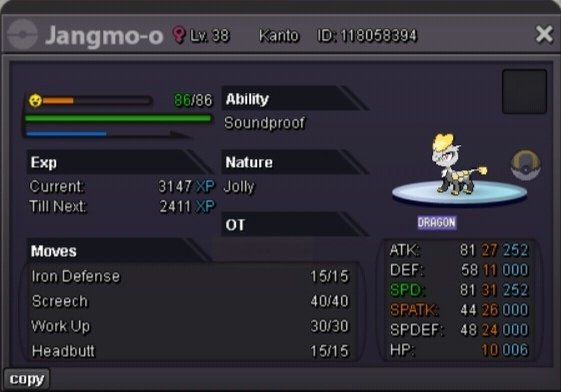
Screenshot_20261127_233634_com_PROTeam_PROClient_UnityPlayerActivity_edit_41958757919045.jpg
Accepted alternative payment methods: Coin Capsule = 500.000, Reroll Ticket = 600.000

Bid history

Sharktapboi02
75.000
2026-11-27 16:40:13
70.000
2026-11-27 16:33:37
Sharktapboi02
65.000
2026-11-27 16:27:26
Bil0di
60.000
2026-11-27 16:22:18
50.000
2026-11-27 16:12:52
Luohan
45.000
2026-11-27 16:12:12
40.000
2026-11-27 16:09:45
35.000
2026-11-27 16:09:38
Rayuz
30.000
2026-11-27 16:05:02
25.000
2026-11-27 15:56:23
20.000
2026-11-27 15:48:21
Rayuz
15.000
2026-11-27 15:47:35
Vanthexor
10.000
2026-11-27 15:46:40
5.000
2026-11-27 15:46:27

Account

Navigation

Search

Search

Configure browser push notifications

Chrome (Android)
  1. Tap the lock icon next to the address bar.
  2. Tap Permissions → Notifications.
  3. Adjust your preference.
Chrome (Desktop)
  1. Click the padlock icon in the address bar.
  2. Select Site settings.
  3. Find Notifications and adjust your preference.