




Skip to content
View in the app

A better way to browse. Learn more.

Pokemon Revolution Online

A full-screen app on your home screen with push notifications, badges and more.

To install this app on iOS and iPadOS
  1. Tap the Share icon in Safari
  2. Scroll the menu and tap Add to Home Screen.
  3. Tap Add in the top-right corner.
To install this app on Android
  1. Tap the 3-dot menu (⋮) in the top-right corner of the browser.
  2. Tap Add to Home screen or Install app.
  3. Confirm by tapping Install.

semi godly H.A 29/31 Grookey

ActiveCross-ServerPokemonAuction
Pankaiz Time left: Highest Bidder: Envymeister
Start price
5.000.000
Instant price
35.000.000
Minimum bid
200.000
Current offer
15.000.000

Image of the Pokemon for sale
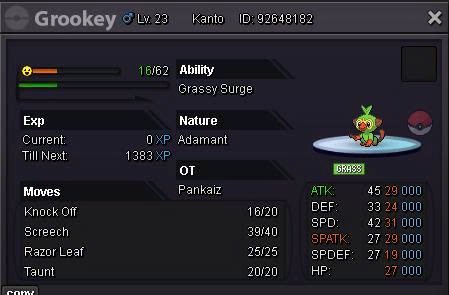
1787757649109_2277535355034211768_8024321730140578431_40627814a30a285c287148de96395a25.jpg

Accepting CC 500k, IV RR 700k

Bid history

Envymeister
15.000.000
2026-08-26 15:55:33
Cattybandit
10.200.000
2026-08-26 15:52:41
Envymeister
10.000.000
2026-08-26 15:46:31
7.200.000
2026-08-26 15:44:18
Mavuika
7.000.000
2026-08-26 15:41:47
5.200.000
2026-08-26 15:35:32
Normalthing
5.000.000
2026-08-26 15:34:28

Account

Navigation

Search

Search

Configure browser push notifications

Chrome (Android)
  1. Tap the lock icon next to the address bar.
  2. Tap Permissions → Notifications.
  3. Adjust your preference.
Chrome (Desktop)
  1. Click the padlock icon in the address bar.
  2. Select Site settings.
  3. Find Notifications and adjust your preference.