




New Trade Zone
Trade Zone is now live
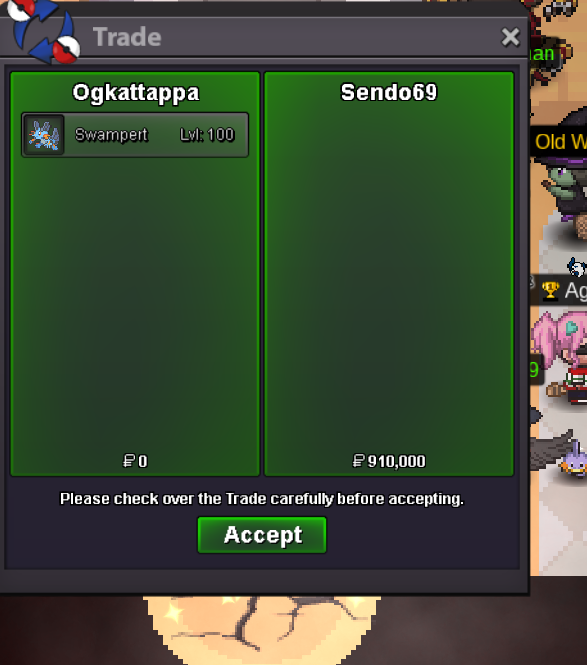
Use the new Trade Zone for auctions and instant-price trades so Pokemon and item offers are easy to find.
All Activity
Past hour
-
Today
-
Thank you.. My problem resolve Thread can be close..
-
East west north west east west north west
-
Mushoom joined the community
-
Ihmtxscv joined the community
-
Jlvteebc joined the community
-
Lotrafkf joined the community
-
-
Lxwtquqx joined the community
-
+1 that item really helpful for me xd xd but my friend that not play at that time don't have it. he even don't know that item existed
-
Softfeather joined the communitybumpHey bro, i wanna the leveling service for 2 pkmsNdysbehw joined the communityMary2789 joined the communityQewtvhvh joined the communityYeicco joined the community
Yesterday
Kaizen now works on Linux and Mac. Download link below https://github.com/KaizenMMO/kaizen-builds/releaseshi im interested on full quest for halloween event map+1 and You should write the effects alongside the moves.Hello, I accidentally released the wrong Pokemon. Could you restore it please? Thank you in advance.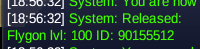 Hello! I'm very sorry for the delay. The item has been removed, and your PvE Coins have been refunded. Please note that not all PvE/PvP items are tradeable. To check which PvE items are tradeable during the current season, you can refer to the official Discord, #announcements channel. As for PvP items, Prestige Mounts are tradeable, but regular Legendary Mounts are not. If you ever have any doubts about an item's tradeability, feel free to ask us here on the forum or through the in-game chat. We'll be happy to help! Since everything has been resolved, I'll go ahead and close this thread. If you need anything else in the future, please feel free to create a new one. Kind regards. Hallowglow.+1 "Just do It" Winston ChurchillHello Hallowglow, Thank you for your suggestion. Unfortunately, I went to Professor Oak's Lab in Pallet Town and interacted with the PC as requested, but it did not resolve the issue. My Pokédex data still appears to be missing, and I am still unable to access Shamouti Island. Could you please forward my case to the appropriate team for further investigation, as you mentioned? Thank you for your continued assistance! Kind regards, NofutureHello! Could you please go to Professor Oak's Lab in Pallet Town and interact with the PC there? Please let me know if this resolves your issue. If not, I'll forward it to the appropriate team so they can look into it. Kind regards. Hallowglow.up+1 - would be beneficial to players who missed the opportunity to claim it.I am writing to submit a suggestion regarding a highly valuable feature that was previously introduced to the game, the IV calculator. I would like to request that the PRO team considers bringing this item back, either as a permanent feature or a reward for participating in World Quests. IVs are a key component to this content and being able to calculate an IV total on the fly assists players in monitoring progress towards the 0.5% threshold. The temporary release of the IV calculator was an incredible quality-of-life addition. Reintroducing the IV calculator as a permanent staple would bring several major benefits to the community: • Streamlined gameplay: Having an in-game tool to instantly check IV totals removes the need for players to constantly tab out of the game to use an third party calculator. It keeps players fully immersed in the client. For example, assists players during the Halloween group hunting contest to monitor and gauge their IV submissions in relation to the ladder. • A great economy sink: If made available via the PvE coin shop or even a hard-to-reach questline, it gives players an exciting, high-value goal to grind towards, further boosting player engagement. Thank you for your tireless work in keeping PRO running and listening to player feedback. This tool was a massive hit during its limited redeem time period, and making it available again would be a fantastic milestone for the game's accessibility in my opinion.+1



















Account
Navigation
Search
Configure browser push notifications
Chrome (Android)
- Tap the lock icon next to the address bar.
- Tap Permissions → Notifications.
- Adjust your preference.
Chrome (Desktop)
- Click the padlock icon in the address bar.
- Select Site settings.
- Find Notifications and adjust your preference.
Safari (iOS 16.4+)
- Ensure the site is installed via Add to Home Screen.
- Open Settings App → Notifications.
- Find your app name and adjust your preference.
Safari (macOS)
- Go to Safari → Preferences.
- Click the Websites tab.
- Select Notifications in the sidebar.
- Find this website and adjust your preference.
Edge (Android)
- Tap the lock icon next to the address bar.
- Tap Permissions.
- Find Notifications and adjust your preference.
Edge (Desktop)
- Click the padlock icon in the address bar.
- Click Permissions for this site.
- Find Notifications and adjust your preference.
Firefox (Android)
- Go to Settings → Site permissions.
- Tap Notifications.
- Find this site in the list and adjust your preference.
Firefox (Desktop)
- Open Firefox Settings.
- Search for Notifications.
- Find this site in the list and adjust your preference.