Skip to content
View in the app

A better way to browse. Learn more.

Pokemon Revolution Online

A full-screen app on your home screen with push notifications, badges and more.

To install this app on iOS and iPadOS
  1. Tap the Share icon in Safari
  2. Scroll the menu and tap Add to Home Screen.
  3. Tap Add in the top-right corner.
To install this app on Android
  1. Tap the 3-dot menu (⋮) in the top-right corner of the browser.
  2. Tap Add to Home screen or Install app.
  3. Confirm by tapping Install.
New Trade Zone
Trade Zone is now live
Use the new Trade Zone for auctions and instant-price trades so Pokemon and item offers are easy to find.
Open Trade Zone

Leaderboard

Popular Content

Showing content with the highest reputation on 11/07/26 in Posts

  1. East west north west east west north west
  2. 1 point
    +1 that item really helpful for me xd xd but my friend that not play at that time don't have it. he even don't know that item existed
  3. 1 point
    +1 and You should write the effects alongside the moves.
  4. 1 point
    +1 "Just do It" Winston Churchill
  5. 1 point
    +1 - would be beneficial to players who missed the opportunity to claim it.
  6. 0 points
    i want buy service story only kanto
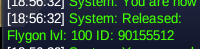
  7. Hello, I accidentally released the wrong Pokemon. Could you restore it please? Thank you in advance.
Account

Navigation

Search

Search

Configure browser push notifications

Chrome (Android)
  1. Tap the lock icon next to the address bar.
  2. Tap Permissions → Notifications.
  3. Adjust your preference.
Chrome (Desktop)
  1. Click the padlock icon in the address bar.
  2. Select Site settings.
  3. Find Notifications and adjust your preference.