




New Trade Zone
Trade Zone is now live
Use the new Trade Zone for auctions and instant-price trades so Pokemon and item offers are easy to find.

Shadowpirate
Registered User
-
Joined
-
Last visited
Everything posted by Shadowpirate
-
New b.o 550k by 7240

-
started 500k by Whatdesu

-
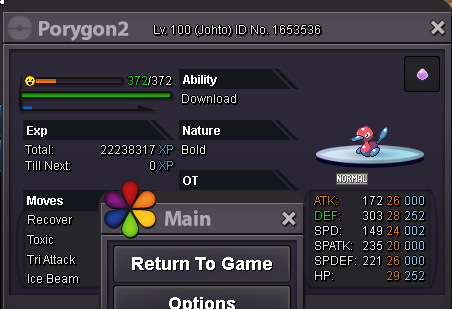
Hi all, I"d like to sell my epic 25 + Porygon, Started 550k by 7240 insta price is 2m Auction ends 3 days afther first offer. I can cancle the auction if i dont like the final offer Offers can not be cancled

-
i'm in
-
500k
-
500k
-
.
-
Can i start 2m ??
-
100/ 150k max trained wrong ability impish need ha
-
3m
-
Start
-
Sold close
-
Yes you won contact me when you can come online to trade :)
-
Oke you got the co it end in 2 days so Saturday at 4 pm ( UTC +2) time zone
-
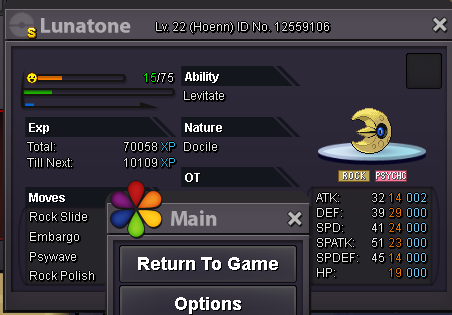
Hi i want to sell this shiny Lunatone ;) Shiny t7/t8 only Price start 800 k by PoroHD insta 2 m Ends in 2 days after first bid
-
Just to mention your azumaril has not the right nature (adamant) but is quriky so its not realy EPIC , so you should better edit the (epic) on topic and say epic ivs instead maby ? Cause when i click on your post i expected to see an epic one with ada nature.... anyway gl selling ;)
-
Sold ingame
-
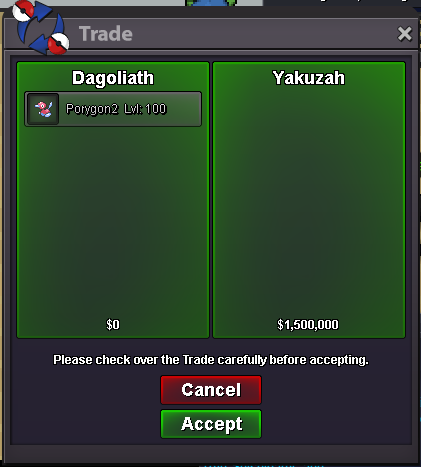
CLOSE Epic porygon2 sold to Yakuzah 1.5 m Ingame
-
2m??? Its alot .. Gl finding buyer tho i doubt ayone will start since it has no pvp nature.. but your poke your price gl...
