




New Trade Zone
Trade Zone is now live
Use the new Trade Zone for auctions and instant-price trades so Pokemon and item offers are easy to find.

Jayesh13
Registered User
-
Joined
-
Last visited
-
Where buddy
-
● What's your Name/IGN?jayesh13 ● Are you active in Discord?yes most of time ● Where are you from?India ● What's your playtime?/How often do you play PRO?588+hrs / plays daily time diff everyday ● What's your goal in PRO?get in top 25 in ladder ● Why do you want to be part of Chaos?to enjoy with top pvp players and learn some pvp lessons ● What's your favorite Pokemon and why?zygrade 100% form it's so op and given best look in Pokemon x and y ● What's your favorite animal and why?my favorite animal is parrot they are so cute.
-
Exadrill 400k
-
U ban or what buddy . I'm looking to buy poke and ur discord name not showing in pro discord. Can u pm me jayesh13#3063
-
Wtb happiny pm me ign jayesh13
-
I don't know about tier but not agree all players atleast use 1 water type generally azu or craw or gyara as far as I seen and they are easy counter with some other poke knowing eq which 1hit ko blaziken.
-
Looking for epic torchic pm if u got
-
Looking for some support cuz broken by last guild democracy. Play time 348+hrs. Ign jayesh13.
-
Sold to infernozen cuz of all fake b.o
-
Bump
-
20m start by infernozen
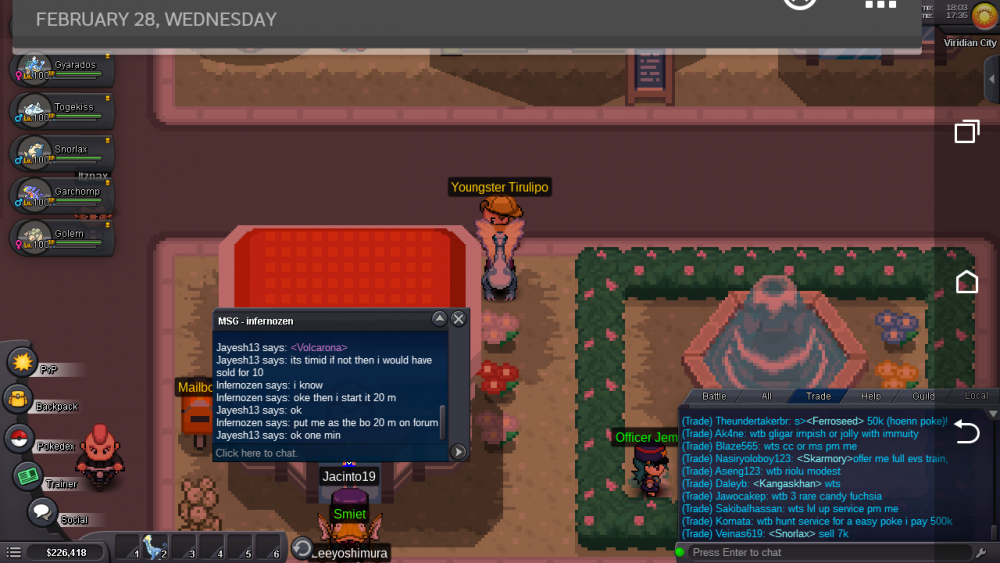
-
Start price
-
Selling b.o. 20m insta 50m for 4 days. Can pm me in game -jayesh13

-
-
What is your Discord tag? »»jayesh13#3063 How often do you use Discord? »»»Everyday. If you could improve PRO's Discord with one suggestion, what would it be?»» I want useful link in discord server back it's hard to get what exactly u want without that.
