




New Trade Zone
Trade Zone is now live
Use the new Trade Zone for auctions and instant-price trades so Pokemon and item offers are easy to find.

Voidwarrior
Registered User
-
Joined
-
Last visited
Everything posted by Voidwarrior
-
Hello, After the update I'm not able to click on a pokemon when linked in any chats. Everything worked fine before update. (Client android) My phone touch screen works perfectly fine aswell and im able to click on anything else just not the pokemons when linked. So it seens it's a bug on the client for android. Please keep me informed when this bug is resolved!
-
@Norex sent me pm disc to make the trade
-
Up
-
you won please contact me
-
Up
-
Up
-
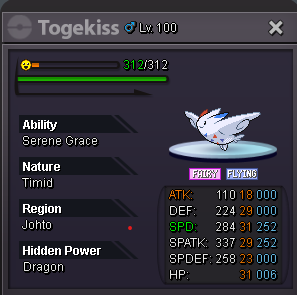
Hi my togekiss is for sale. It's on silver but I can transfer if needed. Start bid is 1k No instant 4 days auction after start bid.
-
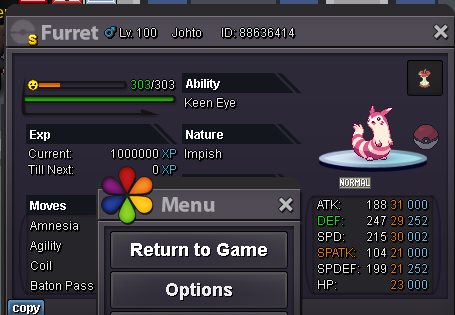
Hello, My shiny Boss furret is for sale, boss ready. Start is 1k No instant 3 Days auction from start bid.
-
2m
-
1.5m
-
i start bid 1m
-
-
Start 5m . Money in silver but I can transfer if win.
-
Auction ended @Hohlyeraser please contact me to arrange the trade.
-
Up almost end
-
Up
-
Up.
-
Up
-
Upp
-
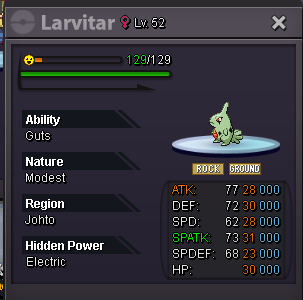
Hi, My larvitar is for sale. (can be used for special attacker set) Start bid is 1k No instant 3 days auction after first bid only cash accepted.
-
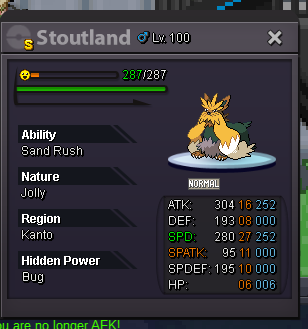
Hello, My stoutland is for sale, Start bid = 1K no instant Ends 4 days after start only cash accepted
-
Up, sold pokes removed + New shinnies added
-
hi you won contact me in pms or in game
-
Up Ends today
-
Up !
