




New Trade Zone
Trade Zone is now live
Use the new Trade Zone for auctions and instant-price trades so Pokemon and item offers are easy to find.

Voidwarrior
Registered User
-
Joined
-
Last visited
Everything posted by Voidwarrior
-
20m
-
Imsta 4m money in silver I will transfer
-
8m
-
@Mozambi making comments on posts isnt allowed either if you check the rules. And that is what you are doing!. You are just mad you saw this post to late and that's a fact. Also there are alot of auctions where the screen shot is not posted. I wil be more carefull on next auctions. Everything is sold and traded 2 weeks ago it can be checked.. I forgot to make screensho and forgot to make the comment. But everyone intressted could see its ended if you check the time. Please close ty.
-
It's 2 weeks later so obviously it's over.. and it's traded/sold. forgot to make screen of trade. Pls close post ty.
-
3.5m*
-
Up almost end
-
Up
-
Hello, This shiny venusaur is for sale Start bid = 30m End: 4 days after first bid No instant Min Raise = 1m If you make a bid with alt acc, please state on which account your money is.

-
Hello, I think i suggested this in the past before. Personally, i feel that there are alot of pve items from bosses which are a bit "useless" and surely if you received /got many of them. There are lot of examples of these: Winter cloths, Some masks, ludicolo outfit and many more. Some of these are "trade locked", others are not. For example logan Mask is trade locked, If you do bosses alot of times you might have recieved a few of those. In my eyes it makes no sence that some items are "tradeable" others aren't. What i suggest: There is already an pvp item buyer in celadon market (You can sell only a few items here already for a decent amount of coins aswell (Tz clothes for example). What i suggest is that we would be able to sell all, or atleast more pve items received from bosses here. For example winter clohtes, in my eyes this is item that not many people want. It would be a good idea if we can sell those itmes here. The coins received would depend on how rare the item is (for example 25/50/100/125... coins. It believe it would be a good idea if we are able to sell more of these unwanted pve itmes for pve coins to item buyer. Clothes / masks / ...

-
Hi no not yet auction is 4 days not 3. It ends today after first start bid was made. Bid was made PM time not AM so it's not over yet.
-
Up
-
Up
-
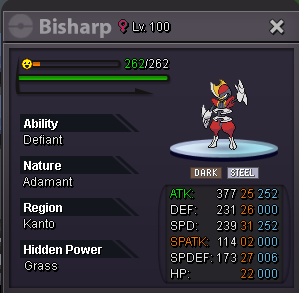
Hello, My Bisharp is for sale, with 31 speed 22+ivs. Start bid = 1k No instant No min Bid Only Cash 4 Days auction after the first bid.
-
1m
-
Hi, i have verfified this my self and your bid was indeed the last bid: Auction started Sunday at 08:45 PM (4 days auction after start) Last bid of Smurf378. Posted yesterday at 08:33 PM Please contact me in pms/ingame so we can arrange the trade.
-
I have undone the trade my self to avoid problems can any staff confirm who won the auction? Thank you.
-
I think I messed up and actually made a mistake and the auction didn't end yet. And i checked the hours wrong.. it seems smurf made a bit last seconds. @Pandarkenciel @Smurf378. @Smurf378Well you could have warned me when you saw I announced winner wrongly instead if being sneaky and bid now would have avoided all this mess. Anyway mistake is mine. I guesse the trade have to be redone/forces again since I wrongly traded the poke. Can you check and do what's nesecary? @Yellow I'm sorry for this inconvenience.
-
Hi you win contact me in pms/ingame
-
No min raise
-
Up
-
Up
-
Up
-
Hello, My shiny breloom is for sale (ability tech h.a) Start bid = 7.5m No instant Only cash Ends 4 days after start bid.

-
Username: Voidwarrior Server : silver Country/Timezone : Belgium/ GMT +2

