




New Trade Zone
Trade Zone is now live
Use the new Trade Zone for auctions and instant-price trades so Pokemon and item offers are easy to find.

Duropass
Registered User
-
Joined
-
Last visited
-
Water spawn broken after server crash.

-
I cant repeat this bug. 😞
-
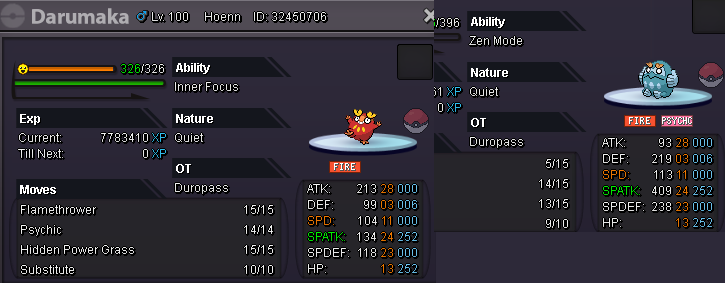
1 - drop Darmanitan's hp below half 2 - start fight (zen mode activated) 3 - using psychic on Arbok and kill it 4 - switch Darmanitan with Abra on 1st place 5 - made relog for teleport in PC ill try to repit this bug with another zen mode Darmanitan later.
-
Hello. My lvl 100 zen mode Darmanitan devolve into Darumaka after relog. I start fight with low hp, Darmanitan turns into Zen-Darmanitan, then i killd arbok and relog.
-
Hi , i accidentally released my Celebi id 23345522. Server - Gold, Name - duropass. Please restore. Thanks.

-
Sarash stuck at volcan pc and cant move, but can move on another account. So please teleport her to another pokecenter.
-
1
-
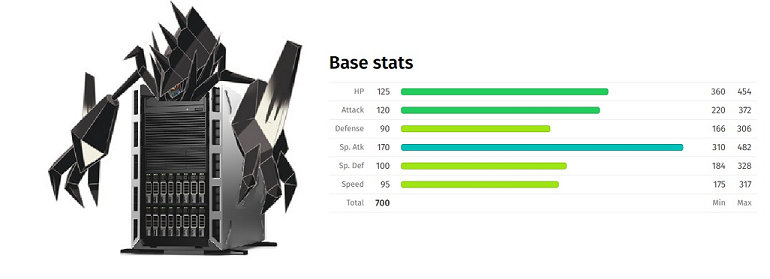
IGN: Duropass Discord name: Duropass#0946 Pokemon name: Pokrevon Pokemon type: Electric - Steel. Ability - shut down (activates after taking any damage) Description: Legendary pokemon loved by everyone, sometimes can cause sadness or joy.
-
In-Game Name: Duropass Discord Tag: Duropass#0946 Server: Gold How often do you use Discord? Everyday What is one suggestion you have for PRO Discord? its fine
