




New Trade Zone
Trade Zone is now live
Use the new Trade Zone for auctions and instant-price trades so Pokemon and item offers are easy to find.

Darkhunter78310
Registered User
-
Joined
-
Last visited
-
Hi there ! 1. In-Game Name (IGN): Yatsu78 2. Country of Origin: France 3. Your favorite Pokemon: Ngl, shiny umbreon is my favorite and that's not a joke (love so much your logo by the way :3) 4. Preferred Activity in PRO? I love hunting (especialy at the specials events), interact and chat with people, the PVE & and I'd really like to try pvp ! 5. What Motivates You to Join Nemesis? I've already been part of a guild on another account and I loved the atmosphere, the support and the good humor, which is why I want to join you ! And yours look like they're having fun, so let's go ! 6. Highest PvP Rating Achieved: Never played it before but it makes me really want to try it ! 7. Discord Tag: yatsu78 8. Age: 23 yo 9. Number of hours playing 311 10. Share a screenshott of your Trainer Card
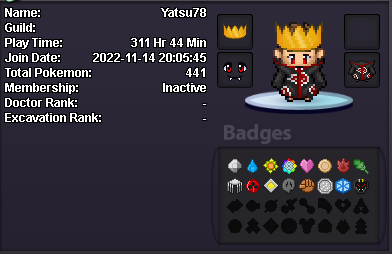
-
" Darkhunter78310 " :D
-
Re: ¤ New Guild Blue Server - Team Plasma Recruiting ¤ <t>(censored) Sorry decevrd word ^^'</t>
-
Re: ¤ New Guild Blue Server - Team Plasma Recruiting ¤ <r>Hi gays my name is "Darkhunter78310", I have 140 hours of play . I have a friend in your guild so I would like joint your guild. <br/> <E>:thanks:</E> <E>:Grin:</E> <E>:y:</E></r>