New Trade Zone
Trade Zone is now live
Use the new Trade Zone for auctions and instant-price trades so Pokemon and item offers are easy to find.

Joosantos
Registered User
-
Joined
-
Last visited
-
I've been using Drifblim with minimize, stockpile and baton pass to fight bosses, and from what I can tell baton pass isnt passing the EVA boost from minimize, though it is passing the DEF and SPDEF boost from stockpile
-
removed
-
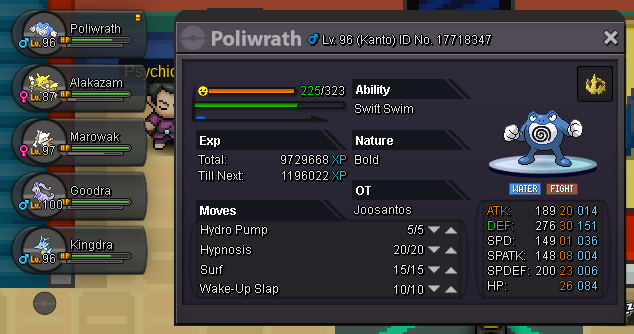
Hey, i learned the evolve trick from this video and decided to use it since i didnt have anyone to trade with, however it did not work in my favor when i tried to evolve my poliwhirl into a politoed (it evolved to poliwrath instead QQ despite being in hold of a kings rock). Is this how the trick is soposed to work or is this a bug? If its a bug can i get my poliwrath gender-bent into politoed?
 welp, i went back to survival area and found a lvl 30 heatran sitting there so i caught it, dont know why it respawned though, anyways thx for your help so far and sry for wasting your time >.<hey, im finally ready to face nikola, but he keeps giving me the same message he would before meeting all the requirements (having caught a legendary and failed to catch another), do you have any idea what the problem might be? (all my team is lvl100 btw)
 I failed to catch heatran (didnt realise it had such a low catch rate >.<), can the staff respawn it or is it gone for good?