




New Trade Zone
Trade Zone is now live
Use the new Trade Zone for auctions and instant-price trades so Pokemon and item offers are easy to find.

Fluffles
Former Staff
-
Joined
-
Last visited
Everything posted by Fluffles
-
Hi there. Please take the time to read what I've stated above. If you encounter any further issues after merging, please do let me know!
-
Glad to hear that your issue has been resolved. If you have any further questions, please don't hesitate to ask. With that said, will now be locking this thread. Good luck and have a great day!
-
Glad to hear that your issue has been resolved. If you have any further questions, please don't hesitate to ask. With that said, will now be locking this thread. Good luck and have a great day!
-
Hello there! If you are still getting an "Invalid Password" error, please be sure to change your password here. Don't forget it has to be Alphanumerical as well. It is important to change your password on the Dashboard rather than the forums since they differ. Hope this helps and have a nice day!
-
Hello there! Please do note that the Red server has now merged with the Blue server to form the Silver server and the Yellow server has now been renamed as the Gold server. If you haven't updated your client you'll have to download the latest update here! If you played on the Red/Blue Server, you will also have to log onto the Dashboard and merge your accounts. Also, don't forget to select the correct server as your main server. Furthermore, please be sure to read the Merge FAQ for questions you may have as well as the Common Merge Errors:FAQ if you encounter issues whilst merging. If you played on the Yellow server, then you may simply log on the Gold server and should still have your items and continue your progress. Hope this helps and have a great day!
-
Hi there. I've recovered your Onix. It should now be in the last slots of your PC. Can you check that for me please? Please be sure to use the Evolution and Deleveling Megathread in the future.
-
Glad to hear that your issue has been resolved. If you have any further questions, please don't hesitate to ask. With that said, will now be locking this thread. Good luck and have a great day!
-
Hi there. Unfortunately, the evolution for Spritzee isn't coded yet. You can find everything about Evolutions in PRO in our List of Evolutions Coded Differently in PRO guide. There is also no Estimated Time as to when its evolution will be coded. However, you can keep an eye out in our Update Logs as well as in #announcements of our Official PRO Discord for updates regarding PRO. With that said, I'm really sorry to disappoint you, but I hope you understand.
-
Aw. Thank you for the kind words. Hope you continue to enjoy PRO. ❤
-
Glad to hear that your issue has been resolved. If you have any further questions, please don't hesitate to ask. With that said, will now be locking this thread. Good luck and have a great day!
-
Hi there. Unfortunately, there isn't any other way to purchase coins with real life money other than with Paypal. As quoted from a Suggestions Sticky: Nevertheless, you may purchase coins in-game in the form of a Coin Capsule (Which gives you 100 shop coins) from other players in the Trade Chat or you can use our Trade Sub-forums. You may also purchase Membership like this. You may find the benefits of Membership here. Let me know if you need further help.
-
Welcome to PRO. Hope you enjoy!
-
Glad to hear that your issue has been resolved. If you have any further questions, please don't hesitate to ask. With that said, will now be locking this thread. Good luck and have a great day!
-
Glad to hear that your issue has been resolved. If you have any further questions, please don't hesitate to ask. With that said, will now be locking this thread. Good luck and have a great day!
-
Hi there. Please do note that in order to get the Rain Badge, you'll have to beat both Juan and Wallace. You can access Wallace by going up the ladder and heading North. For Juan, you can simply fall down the hole after going up the ladder and defeating Wallace to get to him. [spoiler=Wallace] [spoiler=Juan] Let me know if you need further help.
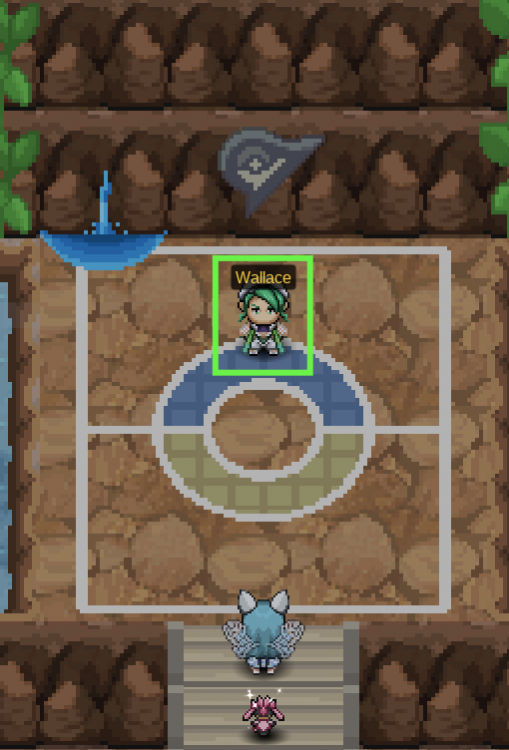
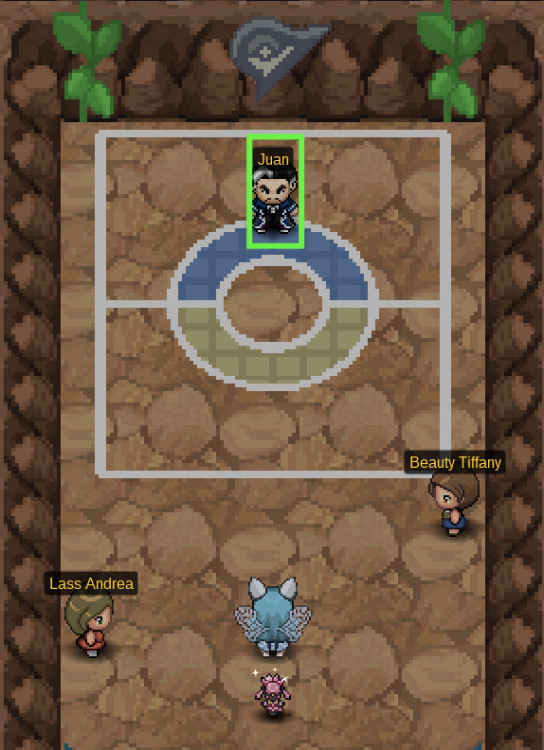
-
Glad to hear that your issue has been resolved. If you have any further questions, please don't hesitate to ask. With that said, will now be locking this thread. Good luck and have a great day!
-
Hi there. To open your pokemon storage, you have to interact with a PC in every pokecenter as shown below. You can store your pokemon by dragging the pokemon from your party to your PC. You can take pokemon from the PC by dragging the pokemon from the PC to your party. Please do note that when linking pokemon, you must put it in your party first. [spoiler=PC] Let me know if you have any further questions.
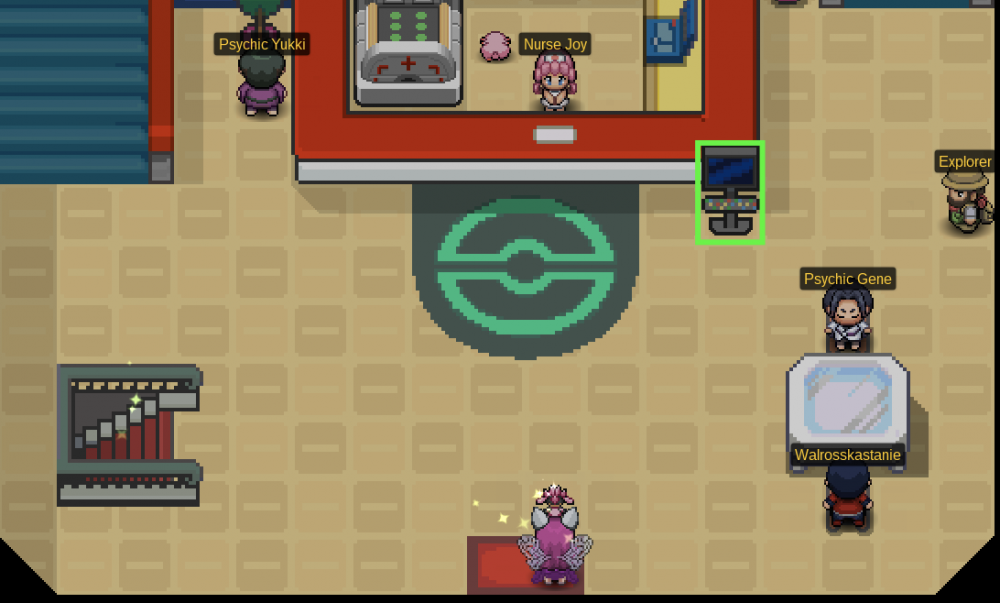
-
Hello there! Please do note that the Red server has now merged with the Blue server to form the Silver server and the Yellow server has now been renamed as the Gold server. If you haven't updated your client you'll have to download the latest update here! If you played on the Red/Blue Server, you will also have to log onto the Dashboard and merge your accounts. Also, don't forget to select the correct server as your main server. Furthermore, please be sure to read the Merge FAQ for questions you may have as well as the Common Merge Errors:FAQ if you encounter issues whilst merging. If you played on the Yellow server, then you may simply log on the Gold server and should still have your items and continue your progress. If you are still missing items, please let me know which ones. Hope this helps and have a great day!
-
Hi there. I've moved your pokemon from your party to the last slots of your PC. Can you check that for me?
-
Hello there! Please do note that the Red server has now merged with the Blue server to form the Silver server and the Yellow server has now been renamed as the Gold server. If you haven't updated your client you'll have to download the latest update here! If you played on the Red/Blue Server, you will also have to log onto the Dashboard and merge your accounts. Also, don't forget to select the correct server as your main server. Furthermore, please be sure to read the Merge FAQ for questions you may have as well as the Common Merge Errors:FAQ if you encounter issues whilst merging. If you played on the Yellow server, then you may simply log on the Gold server and should still have your items and continue your progress. Hope this helps and have a great day!
-
Hi there. Sorry for the inconvenience. Gorebyss should now be able to learn the move at the Pre-Evo tutor. Can you check this for me?
-
Hi there. I understand that Clamperl and not Gorebyss can learn Iron Defense. However, with the help of the Pre-Evolution Move Tutor in the Daycare (Not the Egg Move Tutor), you are able to teach your Gorebyss Iron Defense. Below is an image that may help you in locating the Move Tutor. If the move tutor doesn't let you teach your Gorebyss Iron Defense, please attach a screenshot of you at the Move Tutor and without the option. Looking forward to your response.
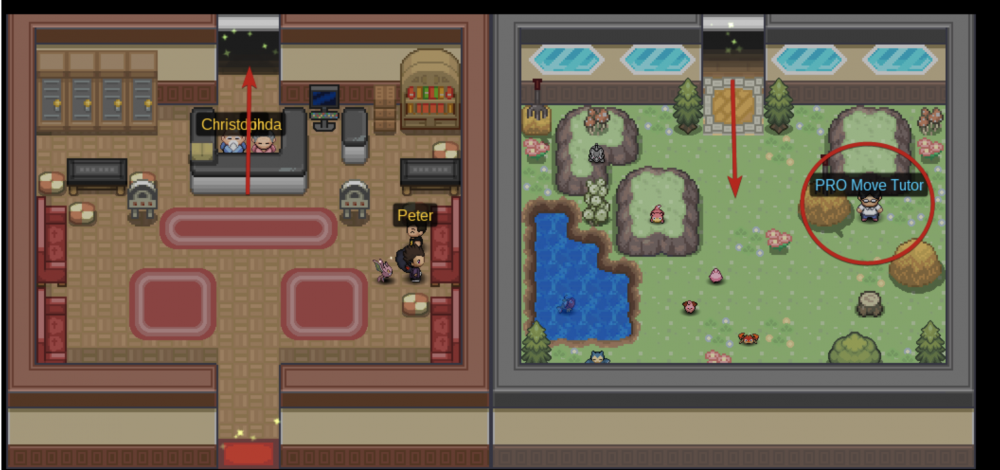
-
Hi there. In order to see Boss Ash, you'll need 180h in Sinnoh as well. You can check this by talking to the Professor in his lab. For an updated list on bosses, you may check out the Boss Guide. Let me know if you need further help.
-
Hi there. Unfortunately, we do not offer de-evolving services. However, you can teach Iron Defense to your Gorebyss by talking to the Pre-Evolution tutor behind every Daycare. You can access the Daycare by completing the Egg Moves Quest. There is a Daycare in each region as listed below. Route 5, Kanto Route 34, Johto Route 117, Hoenn Solaceon Town, Sinnoh Four Island, Sevii Islands Let me know if you have any further questions.
-
Hi there. Unfortunately, we aren't gonna be transferring money, items, pokemon, etc. for you. You'll have to do that manually, which means you'll have to finish Johto on the old account first. Sorry for the inconvenience but I hope you understand. Let me know if you have any further questions.


