




New Trade Zone
Trade Zone is now live
Use the new Trade Zone for auctions and instant-price trades so Pokemon and item offers are easy to find.

Smogking
Suspended
-
Joined
-
Last visited
Everything posted by Smogking
-
I rhink the auction ended ... Where should i meet u?
-
Take my offer back since i realized theres no duration and just nothing to be sure of.... GOOD LUCK
-
350k
-
I start with 700k since u wrote S.O.
-
Start
-
Jughead win with b.o. 700k 🙂 ... since he bid ingame... i will contact him ingame and later drop ss here.... he is offline now.... Timer ended = auction ended8 hours left nowhttps://vclock.com/timer/#countdown=08:00:00&date=2022-02-27T22:06:55I Start thenAccept cc?250k1day and 11 hours leftNotedI hd something to do.... But sure i dont wanna annoy anyone.... Im willing to transfer to gold now....JUGHEAD WON @ 700K Can bid here or In game since im not soo active on discord IGN - Smogking (silver)
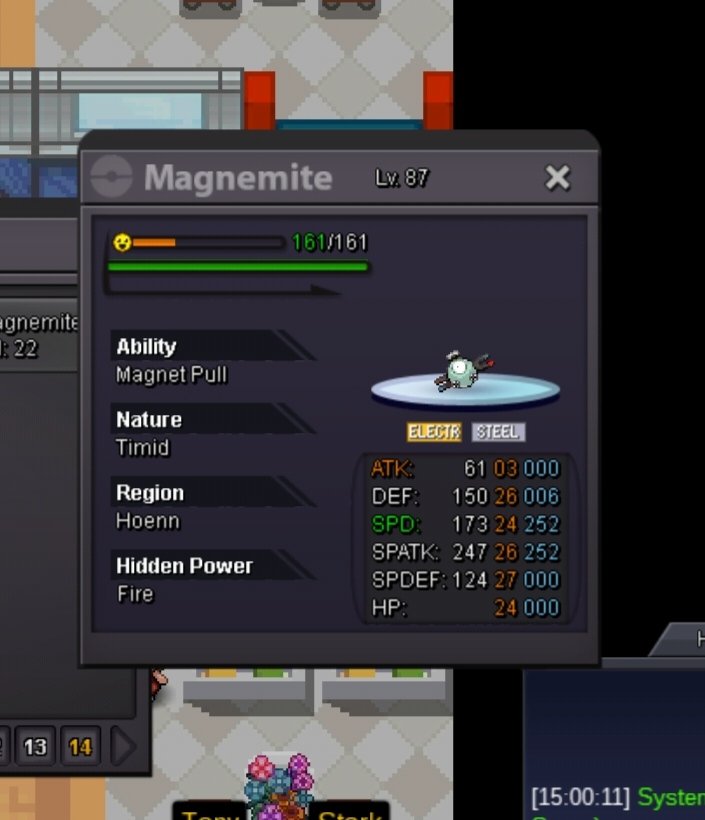 This mon is in silver server.... I go to gold if gold player wins.... Thanks Current bid : 1m by kejnedar Min bid : 200k insta : 4m Accept Coin capsule @ 400k Reroll @ 700k Nature reroll @ 350k Note : Auction starts after 1st bid Duration of auction will be 3days after 1st bid Auction timer Link: https://vclock.com/timer/#countdown=67:59:59&date=2022-03-06T07:40:39 Check here IGN - Smogking Can bid In- game or here
.png.282b2f19dad7f9ff5d887abdce1ea873.png) Good luck 🙂
Good luck 🙂
.png.7e557fcd8156565edc6be80ddd2e26ce.png)



Account
Navigation
Search
Configure browser push notifications
Chrome (Android)
- Tap the lock icon next to the address bar.
- Tap Permissions → Notifications.
- Adjust your preference.
Chrome (Desktop)
- Click the padlock icon in the address bar.
- Select Site settings.
- Find Notifications and adjust your preference.
Safari (iOS 16.4+)
- Ensure the site is installed via Add to Home Screen.
- Open Settings App → Notifications.
- Find your app name and adjust your preference.
Safari (macOS)
- Go to Safari → Preferences.
- Click the Websites tab.
- Select Notifications in the sidebar.
- Find this website and adjust your preference.
Edge (Android)
- Tap the lock icon next to the address bar.
- Tap Permissions.
- Find Notifications and adjust your preference.
Edge (Desktop)
- Click the padlock icon in the address bar.
- Click Permissions for this site.
- Find Notifications and adjust your preference.
Firefox (Android)
- Go to Settings → Site permissions.
- Tap Notifications.
- Find this site in the list and adjust your preference.
Firefox (Desktop)
- Open Firefox Settings.
- Search for Notifications.
- Find this site in the list and adjust your preference.