




New Trade Zone
Trade Zone is now live
Use the new Trade Zone for auctions and instant-price trades so Pokemon and item offers are easy to find.

Jodsn
Registered User
-
Joined
-
Last visited
Everything posted by Jodsn
-
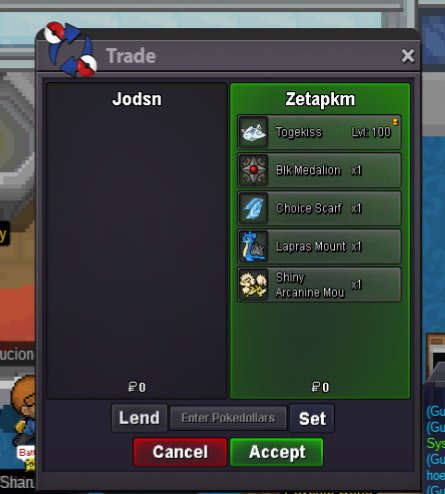
Good evening Staff. The following happens to me. . . A few days ago my partner Guild Zetapkm had some family problems and was about to leave the game. So I leave in possession some Pokemon and items. Inside them was a Togekiss Bold Serene Grace. That Togekiss is the one I'm looking for, since I checked my boxes and there is only the one that my Guildladder lent me. I would like you to review what happened to that Togekiss, I am not sure if I deleted it by mistake, or passed it to someone else, or they never passed the Togekiss.
-
Im start
-
Im search forma a epic joltik or galvantula 31 spd, HP ice, timid, compound eyes.
-
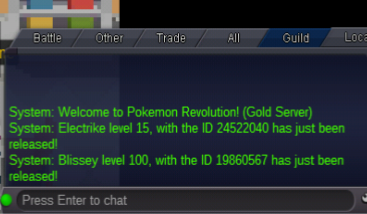
Trow muy Blisssey by mistake. Please, there is the possibility of recovering my blissey, I accidentally throw it away. I have the id number of the pokemon Thanks for the help.
-
Please i need help to recover muy blissey, im click for mistake. Have other form to recover pokes release accidentaly? Thanks forma help

-
Thanks you very mouch forma the help
-
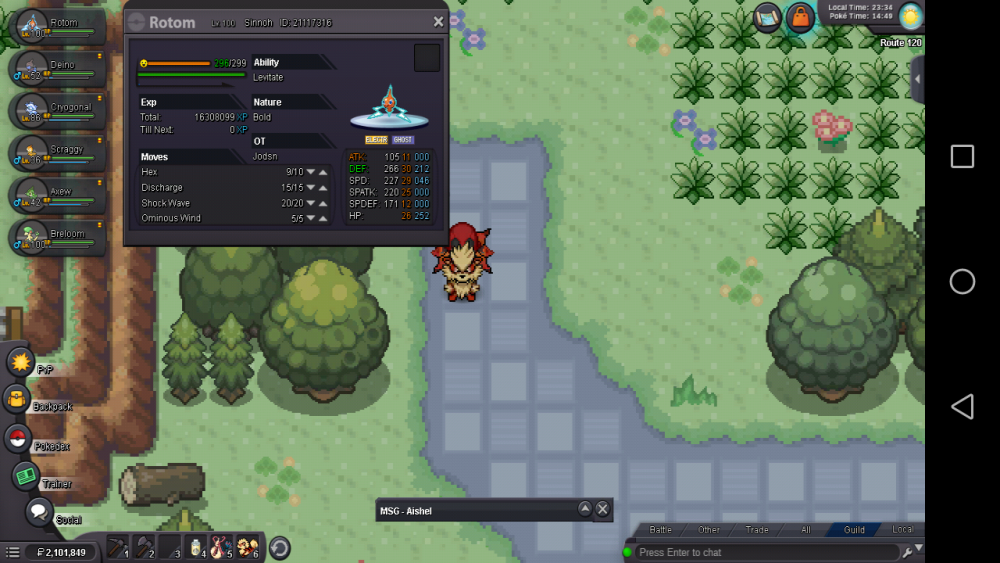
I have a problem, I upgraded my rotom with a rare candy in route 120 and did not evolve, is it a bug or is it done differently? Please help andas thanks forma this.
-
Please, there is the possibility of recovering my scizor, I accidentally throw it away. I have the id number of the pokemon Thanks for the help.

